Feb 2025 - Nov 2025 Solo build: AD, hybrid identity, attack & defend
Hybrid AD & Entra ID Lab
A two-controller Windows Server 2025 forest, hardened with Group Policy and AppLocker, synced to Entra ID, backed up to Azure, then attacked from Kali to prove the hardening holds.

Hybrid AD & Entra ID Lab is a small but real Windows domain built the way a managed environment actually gets built, then attacked to see if the hardening survives contact. It is a two-controller Windows Server 2025 forest on my Proxmox cluster, hardened with Group Policy and AppLocker, extended into the cloud with Entra Connect on free-tier licensing, and backed up to Azure with a restore I actually tested. The thesis is that hardening you cannot attack is just a checklist, so the last chapter is a full Kali kill-chain mapped control by control.
A real domain, not a single DC
The forest is corp.local at the Windows Server 2025 functional level, with two domain controllers: one holding all five FSMO roles, AD-integrated DNS, and the global catalog, and a second as a replica and global catalog.
The OU tree is designed so object placement drives policy — managed users and workstations land in OUs that the right GPOs are linked to, service accounts sit in an OU left deliberately empty, and exactly one account is a Domain Admin.

Hardened with Group Policy and AppLocker
Four GPOs do the work. The managed-workstation policy turns on LSA protection, sets cached logons to zero, disables WDigest plaintext credentials, restricts local administrators to Domain Admins, and disables USB storage and AutoRun. AppLocker started in audit mode and moved to enforced deny, allowing Windows and Program Files but denying executables from Downloads, Desktop, temp, and app-data paths.
The managed-user policy blocks Registry Editor, Task Manager, and admin tools, and browsers run default-deny with a two-extension allowlist.
Hybrid identity on free tier
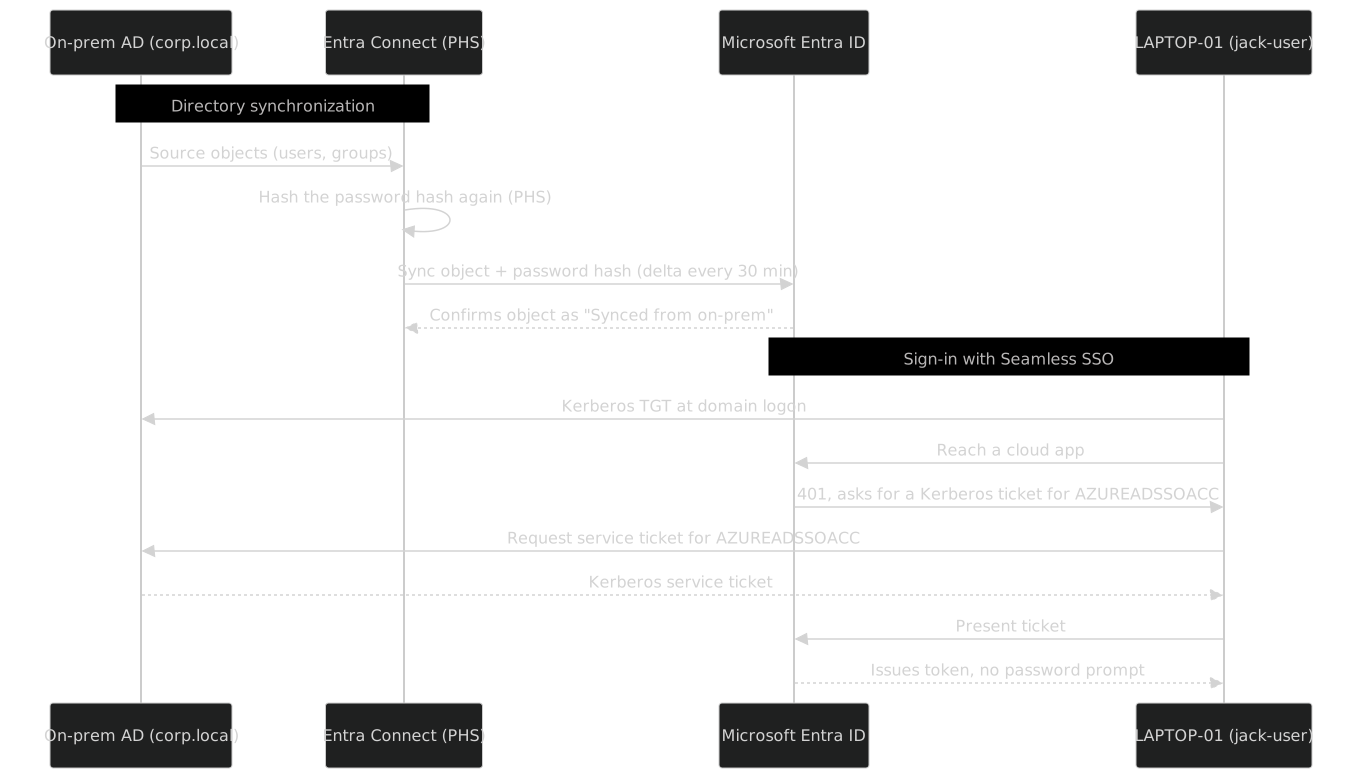
Entra Connect on a domain-joined sync server pushes identity to the cloud with Password Hash Sync, Seamless SSO, and hybrid Azure AD join, filtered to only the user and group OUs. Because corp.local is non-routable, I stamped a routable UPN suffix so sign-ins work in the cloud.
The result is a domain-joined laptop reaching a cloud app and getting a token with no password prompt, on a 30-minute delta sync, all on a free developer tenant.
Backed up, then attacked
Azure Backup’s MARS agent takes a daily System State backup of a controller — NTDS.dit, SYSVOL, and registry — and Azure Site Recovery replicates the whole guest through the agent path since Proxmox is not natively enumerated. I ran a real non-authoritative System State restore to an isolated recovery DC and validated it with dcdiag and repadmin. Then I attacked the lab from Kali.

- LLMNR poisoning
- Captured a NetNTLMv2 hash — a real gap
- Password spray
- Tripped the 5-attempt lockout almost immediately
- Kerberoasting
- Came back empty — no weak SPNs by design
- BloodHound
- Found no path to Domain Admin
- Credential dump
- mimikatz refused to read LSASS thanks to RunAsPPL
Nine chapters
The repo is written as nine chapters, each following the same five beats: the objective, the architecture, the implementation with scripts, how I verified it, and what it demonstrates:
- 01 · On-prem AD build
- Forest and domain design, FSMO placement, multi-DC replication, AD-integrated DNS, and the OU model
- 02 · GPO security hardening
- Group Policy, AppLocker, LSA protection, USB/browser/Wi-Fi control, and logon-hours enforcement
- 03 · Hybrid identity (Entra)
- Entra Connect, Password Hash Sync, Seamless SSO, UPN planning, and hybrid Azure AD join
- 04 · Backup & disaster recovery
- Recovery Services vault, DC system-state backup, Azure Site Recovery, and a documented restore test
- 05 · Attack & defend
- Recon, poisoning, password spray, Kerberoasting, BloodHound, each mapped to the control that stops it
- 06 · Toolchain & walkthroughs
- Step-by-step GPMC, PowerShell, Windows Admin Center/WinRM, OpenSSH, Entra Connect, and the Kali toolset
- 07 · Managed fleet hardening
- Managed OU design, user/workstation GPO separation, AppLocker denies, and browser allowlists
- 08 · Logon-hours offline
- Cached-logon hardening, local scheduled warnings, machine-side SYSTEM enforcement, and timezone fixes
- 09 · WAC & WinRM across subnets
- Windows Admin Center over WinRM, TrustedHosts, scoped firewall rules, and cross-subnet verification