Aug 2025 - Present Solo build: segmentation, firewall, routing
Network Engineering Lab
Turning a flat home network into a segmented, zero-trust one: 12 routed VLANs, a zone-based firewall, WireGuard-only admin access, plus Cisco IOS and subnetting built from scratch.
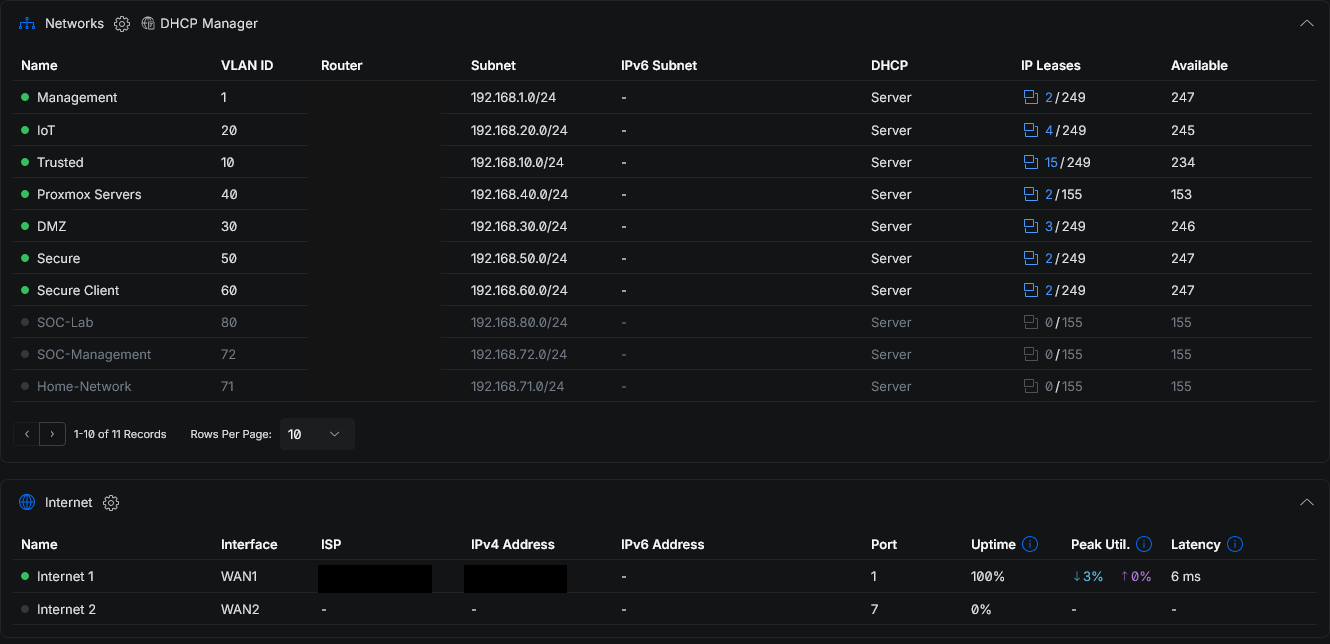
Network Engineering Lab is the segmentation and firewall layer the rest of my home lab sits on. It started as a flat consumer LAN where everything trusted everything — a compromised smart bulb could reach the Proxmox web UI, and the gateway was one guessed password from the whole house. The rebuild is nine projects: VLAN segmentation, a zone-based firewall, threat management, WireGuard remote access, a hardened hypervisor host firewall, a Cisco switch-and-router build, IPv4 subnetting design, the Proxmox cluster join, and SSH hardening across the fleet. Every device now lives in the lowest-trust VLAN that still lets it do its job.
Segmentation and trust tiers
The network is 12 routed VLANs, each its own /24 with its own DHCP scope, grouped into three trust tiers borrowed from production app stacks. An edge and DMZ tier holds anything exposed, an app tier holds the lab servers, and a management tier holds the SIEM, monitoring, and hypervisor admin.
Trust runs inward and data runs outward: the edge can reach specific app ports but not management, the app tier ships logs up to the SIEM but cannot administer it, and management reaches down to scrape and administer while only being reachable from the internal tier and VPN.
A firewall that defaults to deny
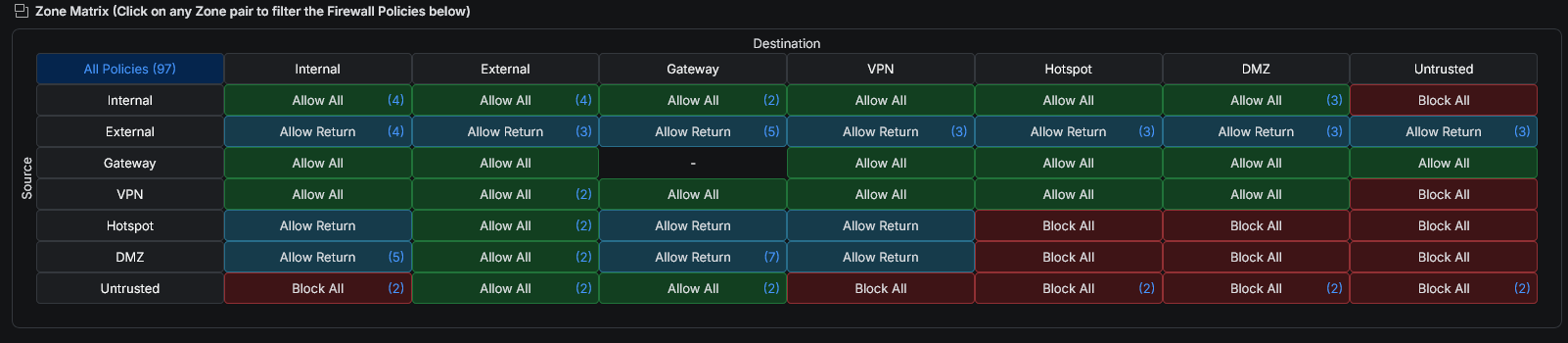
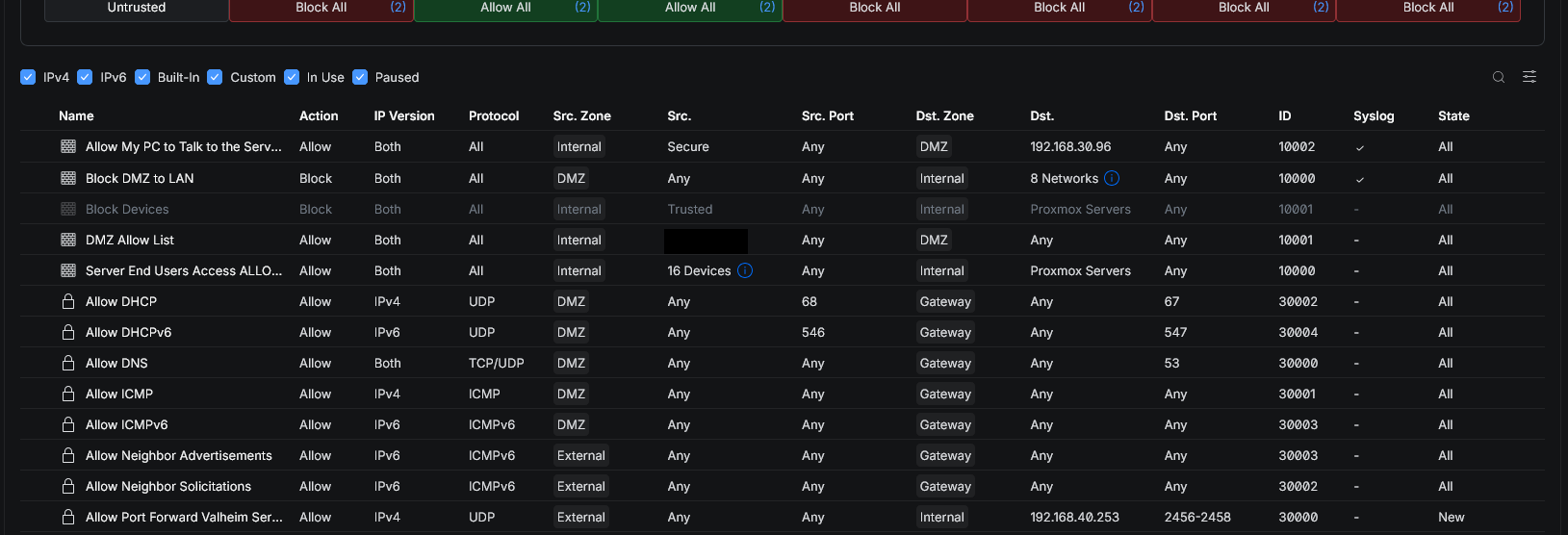
On top of UniFi hardware — a cloud gateway, a 10G core switch, two access switches, and a Wi-Fi 7 AP — sit 9 firewall zones and 17 user-defined policies layered over the default inter-zone matrix. Nothing trusts anything by default; perimeter blocks like DMZ-to-internal are explicit, logged rules rather than relied-on defaults.
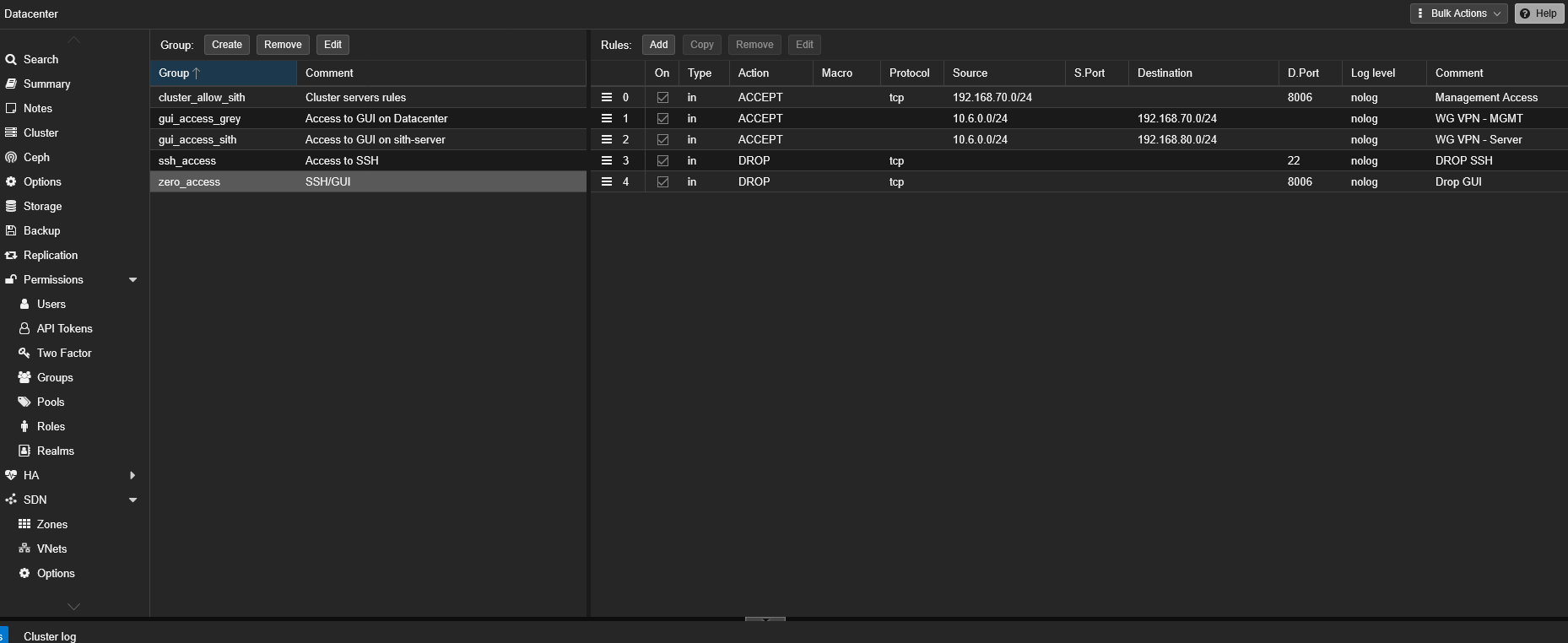
Rules evaluate first-match by index, so tier and admin allows sit at the top, client allowlists below them, and perimeter catch-all blocks at the bottom. The IoT VLAN is isolated to internet-only, and admin access to Proxmox is scoped to four specific clients on just SSH and the GUI port.
Threat management and remote access
Threat management is layered cheapest-first: country blocks for two high-risk regions, then signature-based IDS/IPS in notify-and-block mode across the management, DMZ, IoT, trusted, and secure VLANs, then the zone firewall, with DNS content filtering and three honeypots on the management, IoT, and DMZ segments alongside.
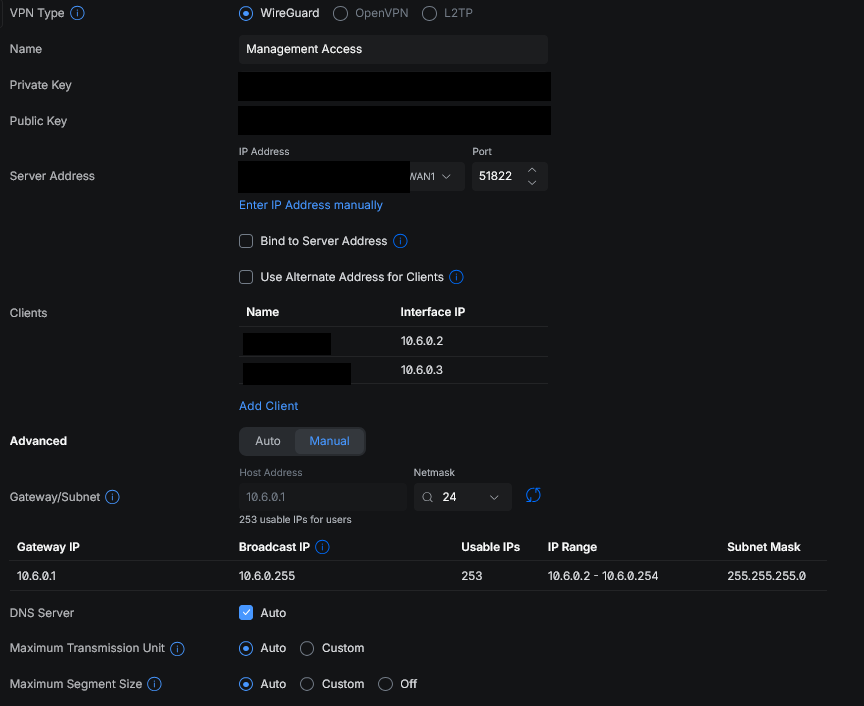
Remote access is WireGuard only — no forwarded admin ports, each peer pinned to a single /32, and the only allowed VPN flows reaching the management and server tiers, never the trusted user network.
From scratch: Cisco, subnetting, and the cluster
Three projects build the fundamentals by hand. A Cisco IOS switch-and-router build routes between two subnets, hardened with SSHv2-only access, password encryption, and shut unused ports, validated bottom-up from show ip interface brief to an end-to-end ping across subnets.
A subnetting project designs three VLSM address plans, including correcting an impossible /24 prompt up to a /21. And the Proxmox cluster join switched from API to SSH-based after a fingerprint mismatch, bringing up a three-node quorum one node at a time while the running guests stayed online.
The nine projects
Each folder in the repo is a self-contained piece of the build, written as a walkthrough of what I did and why:
- 01 · Segmentation & zoning
- The twelve VLANs, nine firewall zones, three-tier compute model, and the switching and wireless that carry them
- 02 · Zone-based firewall
- The seventeen-policy rule set, the inter-zone allow matrix, and the intent behind each allow and block
- 03 · Threat management
- IDS/IPS tuning, country blocking, honeypots, and DNS content filtering
- 04 · WireGuard remote access
- Four VPN servers, the management-only access path, and why no admin port is exposed
- 05 · Hypervisor host firewall
- A default-deny Proxmox host firewall as the second layer behind the network firewall
- 06 · Switch & router build
- A from-scratch Cisco build: addressing, SSH hardening, MAC-table verification, and troubleshooting
- 07 · IPv4 addressing design
- Variable-length subnetting for three network designs, worked end to end
- 08 · Proxmox cluster build
- Expanding one node into a three-node cluster: SSH-based joins, host-firewall remediation, quorum checks
- 09 · SSH hardening & keys
- Key-only SSH, no root login, and Ansible-managed admin keys