Provisioning
How a new Galaxy node or guest gets built. Bare-metal nodes install over UEFI PXE on the provisioning VLAN and join the cluster unattended through Galaxy PXE; guests start from templates and pass the Linux host baseline before they carry a workload.
There are two ways something new appears in the lab. A physical node installs over the network from Galaxy PXE and joins the cluster without me at the console. A guest is cloned from a template or created fresh, then hardened with the Linux host baseline before any workload goes on it. This page covers both, plus the manual join steps the PXE service automates.
Bare-metal nodes: Galaxy PXE
Galaxy PXE is a small provisioning service I wrote for Galaxy nodes. It runs on CT 100 ansible-01 and is deployed there by Ansible, but its machine registry, installer policy, first-boot behavior, tests and records belong to the service.
| Piece | Detail |
|---|---|
| Host | ansible-01 (CT 100, on blue-server) |
| Services | galaxy-pxe.service over HTTP, tftpd-hpa over TFTP, both enabled at boot |
| Provisioning lane | Server-Provision, VLAN 5 |
| Boot loader | Embedded UEFI iPXE, galaxy-ipxe.efi, pinned to one upstream commit |
| Installer | Official Proxmox VE 9.2-1 ISO, prepared with proxmox-auto-install-assistant |
| Join peer | grey-server |
| Last node deployed | green-server, complete at 2026-07-31 12:41:27 UTC |
| Tests | 21 unit tests |
Request flow
- The machine boots UEFI PXE on a switch port whose profile is
Server-Provision, with native VLAN 5. UniFi DHCP hands it a lease and points it atansible-01and thegalaxy-ipxe.efifilename. - The embedded iPXE script sends the machine’s MAC to the HTTP service.
- A machine in
readyatomically claims one attempt and moves toinstaller_claimed. Any other state makes iPXE exit and boot the local disk. - The Proxmox installer posts its system information. The service matches the registered MAC and returns that machine’s answer file, which names only the intended install disk.
- Proxmox’s post-installation webhook reports which disk it installed to. A mismatch records
failed. - First boot reports its own milestones, moves the node from VLAN 5 to tagged MGMT-A and Cluster-Net, fetches a dedicated join key, and joins Galaxy through Grey with
pvecm add --use_ssh. - The service records
completeonly after the node proves both local VLAN addresses, key-only SSH to Grey on MGMT-A, five-node membership, four connected peers on each Corosync link, its required services, key-only root SSH, and the expected NVMe LVM layout with the secondary disk absent from LVM.
The embedded loader is three lines:
#!ipxe
dhcp
chain --replace {{ galaxy_pxe_base_url }}/v1/boot?mac=${net0/mac} || shell
One-use state machine
Every machine has a state, and every callback carries the attempt ID created by the claim, so a stale or wrong attempt cannot advance another run.
disabled -> ready -> installer_claimed -> answer_served
         -> bootstrap_fetched -> installer_succeeded
-> first_boot_started -> network_ready -> cluster_joined -> complete| State | Meaning |
|---|---|
disabled | Default for a new machine. Network boots exit to the local disk. |
ready | The only state I set by hand that allows an install. The next matching PXE request claims one attempt. |
installer_claimed | iPXE claimed the attempt; another PXE request cannot reinstall the node. |
answer_served | The installer received the generated answer. |
installer_succeeded | The webhook reported the expected boot disk. The target disk has been written from here on. |
network_ready | MGMT-A and Cluster-Net are up and Grey is reachable. |
complete | Cluster, service, SSH and storage checks all passed. |
failed | A callback or first-boot check failed; the record keeps the phase and detail. |
Rearming a machine that is active, complete or failed needs a --force flag, and I use it only after deciding another disk erase is intended. The registry, attempt history and timestamps sit under a filesystem lock.
The machine registry holds hardware MACs and addresses, so the live file is git-ignored. The public example shows its shape:
{
  "machines": {
    "<YOUR_NODE_MAC>": {
      "hostname": "<YOUR_NODE_HOSTNAME>",
      "domain": "<YOUR_CLUSTER_DOMAIN>",
      "install_disk": "<YOUR_INSTALL_DISK>",
      "management_cidr": "<YOUR_MANAGEMENT_CIDR>",
      "management_gateway": "<YOUR_MANAGEMENT_GATEWAY>",
      "cluster_cidr": "<YOUR_CLUSTER_CIDR>",
      "cluster_peer": "<YOUR_JOIN_PEER_MANAGEMENT_IP>",
      "cluster_peer_address": "<YOUR_JOIN_PEER_CLUSTER_IP>"
    }
  }
}
Deploying or updating the service is a test run and a playbook, and the playbook refuses any target other than ansible-01:
cd proxmox-pxe-provisioning
python3 -m unittest discover -s tests -v
sudo ansible-playbook playbooks/deploy.yml
Network and firewall around it
- Switch port. The node’s port stays on the
Server-Provisionprofile through install and first boot. I move it toProxmox-Trunk(no native VLAN) only after the node reachesnetwork_ready, answers on MGMT-A and shows up in the cluster. - Callbacks. Two UniFi policies let the node call home on the service’s HTTP port: one from the Server-Provision network for the VLAN 5 phase, and one from the
AG-Proxmox-Nodesaddress list after cutover. A future node gets its management address added to that list instead of a new policy. - Proxmox side. The new node’s management address goes into the Datacenter firewall’s
pve_clusterIPSet before the install, so the existing nodes accept it. - Guests too.
Proxmox-Trunkhas carried VLAN 5 tagged since 2026-07-31, so a node can also PXE-boot a guest on the provisioning lane.
Constraints I found the hard way
- Secure Boot must be off. The custom iPXE loader is unsigned.
- At least 12 GiB of RAM, 16 preferred. A 7 GiB acceptance VM ran out of space while unpacking the installer initramfs. The same path completed at 12 GiB.
nomodesetis on the kernel line. It is Proxmox’s documented workaround for an installer framebuffer hang. I added it after Green’s first run hung, although that run did not leave enough evidence to prove a framebuffer fault.- The first TFTP request after a daemon restart can time out. I found this on 2026-09-12 after
ansible-01moved to Blue. A retry succeeds and the full loader transfers byte for byte, but the root cause is open.
How Green actually went
Green, a Lenovo ThinkCentre M920q, was the first physical install, and it did not work on the first try.
On 2026-07-31 Green downloaded the whole installer path and installed Proxmox, then never came back. The old service had sat in installing for over 40 minutes with no way to tell me why, and Green had no display, no working AMT and no managed outlet, so the only recovery was its power button. When I later inspected the finished first install, the first-boot log showed the real cause: the installed system could not reach ansible-01 from VLAN 5, because no UniFi policy allowed the callback.
Before rerunning on hardware I rebuilt the service around the attempt-ID state machine, swapped an unusable password-based join for a dedicated SSH key, and proved the whole path on a disposable UEFI VM (999) on Red. That VM found two more bugs: the 7 GiB memory limit, and an acceptance-only answer value spelled poweroff where Proxmox wants power-off. With the callback policies in place, the physical rerun installed cleanly, then stalled at first_boot_started because the first callback fired before the service was ready and the script used ping as a gate. I made the callbacks retry, replaced the ping gates with the SSH check, and Green went from network_ready to complete in 24 seconds. The provisioning record has every step.
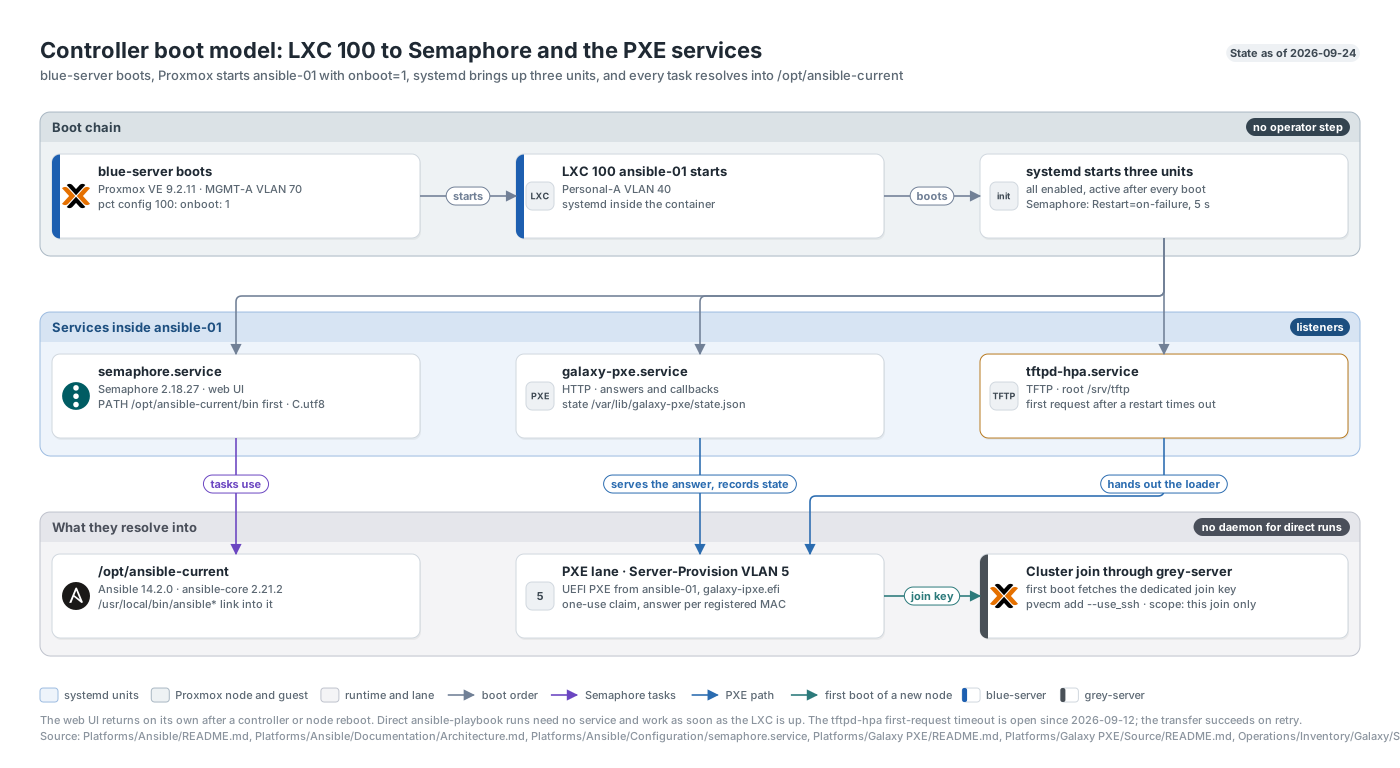
The controller boot chain: blue-server brings up ansible-01, whose three units become Semaphore, the PXE lane the nodes install from, and the cluster join.
Joining a node by hand
The PXE first-boot script automates the same sequence I used for Purple and Blue in May and Red in July. Done by hand, a join looks like this.
1. Preflight on every node. Same Proxmox version, no guests on the joiner, time in sync, unique hostname:
pveversion | head -1
qm list; pct list
timedatectl | grep -E "synchronized|Time zone"
Proxmox will not join a node that already owns VM or container configurations, and Corosync is sensitive to clock drift.
2. Fix the network from the console. The trunk ports have no native VLAN, so the installer’s untagged address cannot reach anything. On the console I build a VLAN-aware bridge and put the management address on a tagged sub-interface:
auto vmbr0
iface vmbr0 inet manual
        bridge-ports nic0
        bridge-stp off
        bridge-fd 0
        bridge-vlan-aware yes
        bridge-vids 2-4094

auto vmbr0.70
iface vmbr0.70 inet static
        address <node-management-address>/<prefix>
        gateway <mgmt-a-gateway>
Then ifreload -a and a reachability check to the gateway and to Grey. The May reference admitted only the VLANs then in use on the bridge; the four original nodes have since been normalized to 2-4094.
3. Open the path to the founder. Add the joiner’s root public key to Grey and its address to the Datacenter firewall, then confirm a batch-mode SSH login works. In May the joiners’ SSH to Grey was silently dropped until their addresses were in the active firewall group.
4. Join over SSH.
pvecm add <grey-management-address> --link0 <node-management-address> --use_sshI use --use_ssh because the API join failed twice in May: Grey’s custom pveproxy certificate made the API report a different fingerprint, and the next attempt stopped waiting for an interactive password.
5. Count it done only when it is. A join is not finished when the command returns. I count it done once pvecm nodes lists the new node, quorum holds, /etc/pve/nodes/<node> exists, and the web UI shows the same member count. One node at a time, with quorum checked before the next.
6. Add Cluster-Net and the node baseline. Create vmbr0.71 for Corosync link1, add the node to Corosync with a new config_version, apply key-only root SSH, install the subscription popup script and its APT hook, and add the node to monitoring and the UniFi AG-Proxmox-Nodes list.
The details of the cluster the node lands in are on Proxmox cluster.
Guests: templates
All three templates live on Grey’s ssd-lvm1 and use UEFI (OVMF), the q35 machine type, virtio-scsi-single, CPU type host and the QEMU guest agent.
| VMID | Template | OS | Size | Default VLAN | Use |
|---|---|---|---|---|---|
| 9000 | ubuntu-cloud-template | Ubuntu 24.04.4 LTS | 2 vCPU, 2 GiB, 20G | 80 | Ubuntu cloud template with a cloud-init drive |
| 101 | debian13-template | Debian 13 | 4 vCPU, 4 GiB, 60G | 40 | General Debian base |
| 300 | ws2025-template | Windows Server 2025 Standard | 4 vCPU, 4 GiB, 80G, TPM 2.0 | 65 | Sysprepped Windows Server base with OpenSSH Server and the virtio driver media |
Template 300 was built on 2026-09-08, and the next day I cloned HQ-DC01, HQ-DC02 and HQ-MGT01 from it for the Active Directory build. Clones of it share the template’s SSH host keys until I delete them and restart sshd, because sysprep does not regenerate them.
A guest attaches to vmbr0 with the VLAN tag of the network it belongs on, and the placement rules on Network decide which one. For containers, the reference build is CT 107 docker-network: created on 2026-07-10 on VLAN 85 with 2 vCPU, 4 GiB of memory (cut to 2 GiB on 2026-08-10), a 32 GiB root disk, nesting on, key-only SSH and Docker.
The Linux host baseline
Every Linux VM or LXC passes the same baseline before it carries a workload. The full walkthrough is on Linux baseline; in short:
- Patch.
apt upgrade(ordnf upgradeon the RHEL family), and no workload until it exits 0. - One administrative account in the
sudogroup, with noNOPASSWDfor a human. - Three approved public keys in that account’s
authorized_keys. - Key-only SSH: root login off, password and keyboard-interactive authentication off, checked with
sshd -tbefore a restart. - Root keeps a password, and sudo asks for it through
Defaults rootpw. A stolen key or a stolen login password alone is not root. Root’s password must be proven withsu -first, or every account loses sudo at once. - Time and locale:
America/New_Yorkanden_US.UTF-8.
After that the host joins the fleet: the Wazuh agent, node_exporter for Prometheus, and Ansible-driven updates through the unattended automation account, which is the only account that carries NOPASSWD. On 2026-09-07 I verified the sudo and SSH model on all eleven guests then in the fleet. Windows hosts follow separate records.