Photos and media
Immich for the photo and video library, with GPU transcoding and machine learning on a GTX 1080 Ti and its library on a ZFS pool, and the Jellyfin media stack with request handling and a VPN-isolated downloader.
Two platforms hold my personal media. Immich keeps the photo and video library on docker-main, and the media stack on media-01 handles requests, release automation, downloading and playback with Jellyfin. They run on different nodes, with different disks and different GPUs.
Immich
On 2026-09-24 Immich ran v3.2.2 on docker-main (LXC 110 on grey-server) as four containers:
| Container | Image | Role |
|---|---|---|
immich_server | Immich release tag, v3.2.2 | Web app, API and the background workers |
immich_machine_learning | release-cuda, v3.2.2 | Smart search, faces and OCR on the GPU |
immich_postgres | 14-vectorchord0.4.3-pgvector0.8.1-pgvectors0.2.0 | Database with vector search |
immich_redis | Valkey 9 | Queue and cache |
The server and machine-learning images track Immich’s release tag, which is why the move from 3.2.0 to 3.2.2 has no change record of its own. PostgreSQL stays on Immich’s exact supported build, and Valkey on the release-supported image. The Compose project lives in /opt/docker/immich-app and runs as Compose project immich. The repository keeps the live docker-compose.yml and the release’s two hardware overlay files; the .env with the database password stays on the host.
I reach Immich over internal HTTPS through Nginx Proxy Manager, which is set up for large uploads: request buffering off, request bodies up to 50,000 MiB, and 600-second proxy and send timeouts. Only the proxy may reach Immich across zones; the database, Valkey, machine learning and storage paths are not published.
GPU transcoding
The GTX 1080 Ti in grey-server was first passed into docker-main for Ollama on 2026-09-04. The node owns the NVIDIA kernel driver, 580.159.03 on the proprietary R580 branch, which is the last branch that supports this Pascal card. The LXC carries matching user-space files and NVIDIA Container Toolkit 1.20.0-1.
On 2026-09-05 I moved Immich’s video transcoding from the LXC’s four vCPUs to the card. I added the extends block pointing at the nvenc service from Immich’s hwaccel.transcoding.yml and set runtime: nvidia, which the nested LXC requires. A synthetic h264_nvenc encode passed inside the container, and the first live transcodes logged NVENC-accelerated encoding and decoding with the encoder at 55% and 329 MiB of GPU memory.
Warning: Pascal’s HEVC encoder supports neither B-frames nor temporal AQ. A test encode with
-temporal-aq 1failed withProvided device doesn't support required NVENC features. Both settings stay off in Immich’s video transcoding page; turning either on fails every HEVC transcode on this card.
Machine learning
The same day I moved machine learning onto the card with the release-cuda image and the cuda service from hwaccel.ml.yml, and switched to larger models the GPU makes practical:
| Feature | Model | Notes |
|---|---|---|
| Smart search (CLIP) | ViT-SO400M-16-SigLIP2-384__webli, 1152 dimensions | Replaced ViT-B-32__openai. Highest recall in Immich’s English table and multilingual. Immich resized the vector column on start and dropped the old embeddings |
| Facial recognition | buffalo_l | I briefly chose antelopev2 and reverted the same evening, before any face job ran on it, because Immich’s documentation calls the default typically the best |
| OCR | PP-OCRv5_server | Replaced the mobile model |
After the change the re-index jobs rebuilt 5,889 smart-search embeddings. The first OCR run overlapped a transcode sweep and smart search, and 4,408 of its jobs failed when the card ran out of memory. Run on its own, OCR finished clean with 8,487 text regions across 4,995 assets. The rule I took from it: run one All-mode job at a time on this card.
I then tuned facial recognition: detection score 0.65, maximum recognition distance 0.55 (default 0.5) and minimum recognized faces 5 (default 3). Most faces in this library come from video frames, which is the population that ends up unassigned or in tiny clusters. A Missing-mode run cut unassigned faces from 1,050 to 843 and kept all 52 named people. I ruled out the All-mode face jobs, because in v3.1.0 they delete existing faces and take the names with them.
The card is shared: a loaded Ollama model, a running transcode and Immich’s models all draw on the same 11,264 MiB, which is what the contended OCR run above ran into.
The ZFS library and the transcode policy
The library lives on ZFS pool hddpool-1, a single Toshiba 2 TB disk in grey-server, mounted into the LXC as /data through mount point mp0. Immich’s uploads are under /data/immich/library and its PostgreSQL data under /data/immich/postgres.
On 2026-09-05 the volume was at 83% with 316 GB free. Originals made up 1.2 TB and were not up for discussion; the one reclaimable block was 266 GB of transcoded copies. The policy was all with only HEVC accepted, so every one of 5,367 videos had a second copy, even though a sample of 59 originals showed 55 H.264 and 3 HEVC files that every browser and the mobile apps play directly. I changed the policy to optimal and accepted H.264 and HEVC, keeping the HEVC target, 1080p, CRF 28 and NVENC. Now a video is transcoded only if it is above 1080p or in a codec or pixel format outside the accepted list.
Immich doesn’t sweep old transcodes when the policy changes, and most videos had been imported before the per-asset stream table existed, so the first sweep silently skipped them. A metadata extraction pass followed by a second transcode sweep finished the job:
| Metric | Before | After |
|---|---|---|
| Transcoded copies | 5,377 | 110 |
library/encoded-video | 266 GB | 27 GB |
/data used | 83%, 316 GB free | 70%, 558 GB free |
The nightly database dumps under library/backups stay at Immich’s default retention of 14.
The storage migration
On 2026-05-28, under Immich v2.7.5, I moved the library from a 4 TB WD Red Plus to the 2 TB Toshiba. The WD was going to another machine, the Toshiba was smaller, and the database and files had to move from the same stopped state.
- Map every dependency. I checked every guest configuration and Docker bind mount that referenced the old pool,
hddpool. LXC 110 mounted it as/data; Immich and Forgejo were the only active consumers. I also found stale Calibre and Nextcloud leftovers and three empty placeholder datasets. - Move the unrelated workload. Forgejo’s 2.6 MB went to the LXC’s NVMe storage, and the leftovers and empty datasets were removed.
- Take the rollback point. I triggered a fresh database dump from Immich’s Job Queues page, checked its gzip integrity and its PostgreSQL header and footer (40 MB compressed, about 103 MB raw), and copied it off
grey-server. - Build the new pool. The Toshiba passed SMART with zero reallocated, pending or CRC-error counts, but had high power-on hours and load cycles. I wiped it, created single-disk ZFS pool
hddpool-1in the Proxmox UI by its persistent device path, and confirmed itONLINE. - Shrink what can be regenerated. With Immich stopped, I deleted only the contents of
encoded-video, which took the dataset from about 1.9 TB to about 825 GB. Originals, uploads, profiles, thumbnails and the database stayed. - Move the volume. With LXC 110 stopped,
pct move-volume 110 mp0 hddpool-1copied the volume without the delete flag. It moved about 886 GB across 32,000 files at about 132 MB/s in under two hours. - Verify.
/datacame from the new pool, all four containers came up healthy, the web UI answered HTTP 200, and in the UI the timeline, album covers, named people, full-resolution photos and video playback all worked. - Retire the old disk. Only then did I destroy the old subvolume and pool, remove the Proxmox storage entry, rebuild the transcode cache and pull the WD.
pct move-volume 110 mp0 hddpool-1
# after every check passed
zfs destroy hddpool/subvol-110-disk-0
zpool destroy hddpool
pvesm remove hddpool
The rollback plan rested on step 6 keeping the source. If the Proxmox task failed, I would leave LXC 110 stopped and inspect both pools before retrying. If Immich failed after the move, I would point mp0 back at the retained WD subvolume and check the mount before starting Compose. The database dump covered metadata such as albums, faces and shared links. It holds no photos, so it only works paired with the files, which is why the WD copy stayed until the application checks passed.
Note:
hddpool-1is one disk with no redundancy, and the Toshiba already had high power-on hours when it went in. A drive failure takes the library with it.
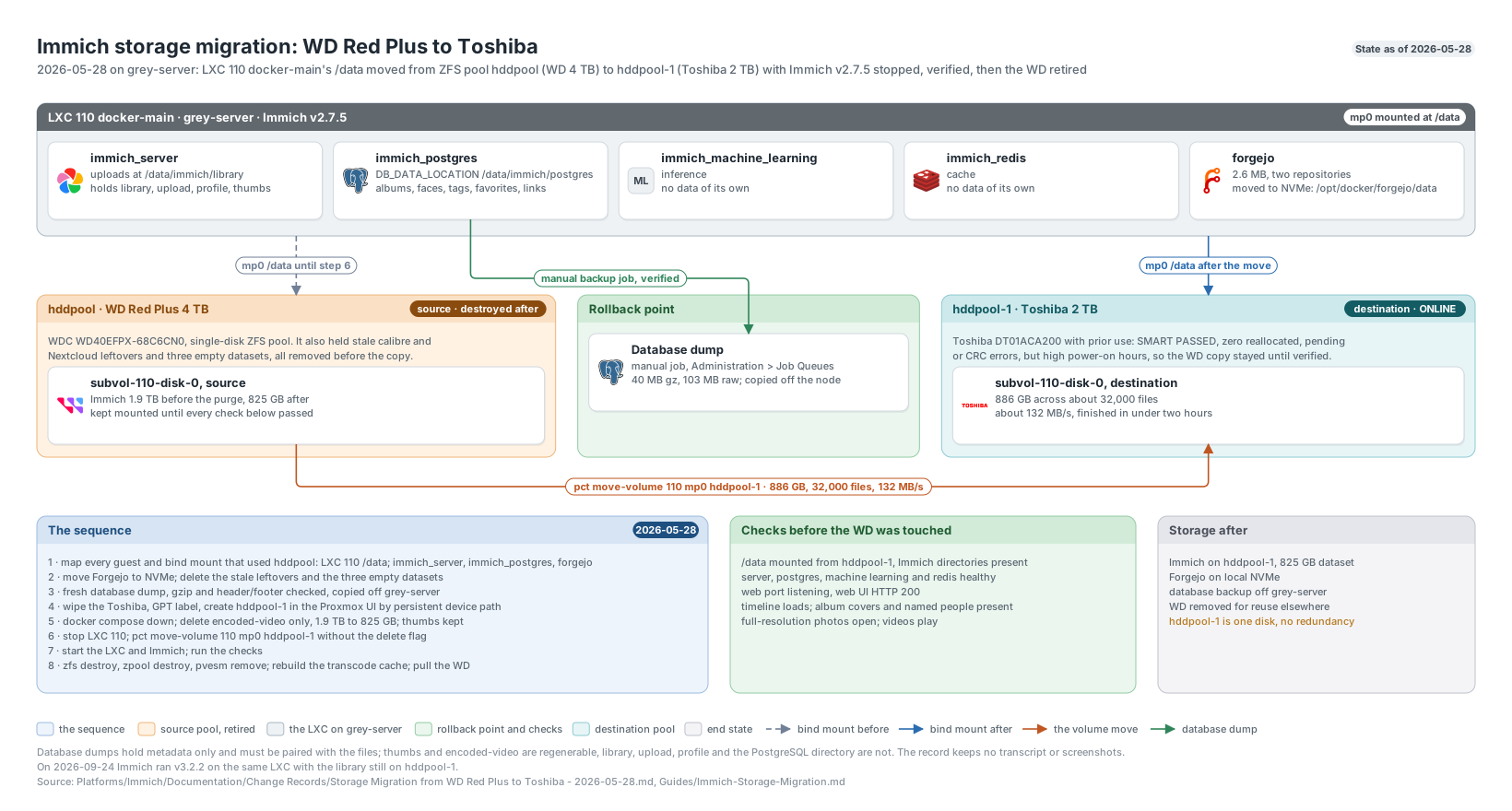
The 2026-05-28 storage migration from the WD Red Plus to the Toshiba: the sequence, the rollback point and the checks. Click to enlarge.
Media stack
The media stack runs on CT 842 media-01 on red-server: an unprivileged Debian 13 LXC with 2 vCPU, 4 GiB of memory and 1 GiB of swap. One Compose project, /opt/media-stack/compose.yml, runs eight containers. Versions are from 2026-09-24.
| Service | Version | Role |
|---|---|---|
| Jellyfin | 12.1.0 | Libraries and playback, with Intel Quick Sync transcoding |
| Seerr | 3.4.1 | Requests. The container keeps the name jellyseerr so the existing database carried over |
| Sonarr | 4.0.20.3014 | Television and anime |
| Radarr | 6.4.4.10685 | Movies |
| Prowlarr | 2.6.5.5623 | Indexer management for Sonarr and Radarr |
| FlareSolverr | 3.5.2 | Challenge proxy for the one indexer tagged to need it; not published |
| qBittorrent | 5.2.3 | Download client, inside Gluetun’s network namespace |
| Gluetun | latest | Proton VPN WireGuard tunnel, kill switch and forwarded port |
cAdvisor and the Dockhand agent run beside it in their own projects. All application images track latest, and Dockhand applies new images nightly; when I update by hand I record image IDs first and then verify health, hardware acceleration, the VPN exit, port sync and the download-client tests afterwards.
How a request flows
- I ask for a title in Seerr. Seerr’s default Sonarr server sends standard series to the television root with the
HD-1080pprofile, and titles carrying TMDB’s anime keyword to a separate anime root with an anime profile. Movies go to Radarr. - Prowlarr supplies the indexers to Sonarr and Radarr. Three are configured. The anime indexer is scoped to Sonarr with a
moviestag arrangement so it never reaches Radarr, and FlareSolverr handles challenges only for the indexer tagged for it. - Sonarr or Radarr hands the release to qBittorrent, which can only leave the host through the VPN tunnel.
- When the download completes, Sonarr or Radarr imports it as a hard link into the library. Downloads and libraries share one filesystem, so nothing is copied.
- Jellyfin picks the file up in its Movies, TV Shows or Anime library and plays it, transcoding on the Intel GPU when a client needs it.
I proved the whole path on 2026-07-21 with one television episode and one movie: both came through Prowlarr and the VPN-isolated downloader, matched the payload filter during transfer, imported as hard links, appeared after the library scan, and played with the GPU active.
Anime got its own path on 2026-08-23 and 2026-08-27. It has its own Sonarr root, a Jellyfin shows library with AniList first in its metadata order, and a TRaSH Guides [Anime] Remux-1080p profile with 40 custom formats that rank release groups into tiers. I didn’t apply the guide’s anime quality definitions, because they are one set per Sonarr instance and would strip the size limits from the standard television profile.
The VPN-isolated downloader
qBittorrent runs with network_mode: service:gluetun, so it has no network of its own. Its only path out is Gluetun’s Proton WireGuard tunnel with the kill switch on, and every other application uses the guest’s normal VLAN 40 path. I confirm the provider exit from inside the shared namespace without recording the address.
- Gluetun writes the provider’s forwarded port into qBittorrent. The UniFi gateway has no port forward, UPnP is off, and qBittorrent’s random port is off, so I compare qBittorrent’s listening port with Gluetun’s forwarded-port file after any reconnect.
- If the port goes stale, I recreate Gluetun and qBittorrent together so dependency order and port sync are applied again. I never remove the shared network mode as a troubleshooting shortcut.
- qBittorrent’s local authentication bypass is limited to loopback, for Gluetun’s port callback, and to the stack’s Docker subnet, for Sonarr and Radarr. I don’t weaken authentication for any other network.
- qBittorrent’s Excluded file names setting holds a 100-pattern baseline that rejects executable, installer, script, shortcut, macro-enabled document, driver and loadable-library suffixes while still allowing media, subtitles, archives and disc images. Automatic command execution is off.
On 2026-09-27 I exposed Gluetun’s control API to Homarr with a dedicated key whose role allows only four GET routes: VPN status, DNS status, public IP and VPN settings. Nothing can stop, start or reconfigure the tunnel through it.
Storage
The 100 GiB NVMe root holds Debian, Docker, the Compose project, application configuration, databases and Jellyfin’s cache. A 1 TB Seagate ST1000LM035 holds /data: movies, television, anime, downloads and transcodes, 916 GiB usable as ext4. I moved the data there on 2026-07-22 and chose ext4 on one full-disk partition because the drive uses drive-managed SMR and holds replaceable media.
The bind source is a data directory that exists only on the mounted HDD, so CT 842 refuses to start when the disk isn’t mounted rather than letting applications write into an empty directory on the root disk. I tested that guard before deleting the old copy.
Jellyfin
Jellyfin moved from 10.11.11 to 12.0.0 on 2026-09-09. The first start reset the encoding configuration after rejecting an old empty encoder preset, so I restored the Quick Sync settings with Jellyfin stopped and confirmed a synthetic h264_qsv encode. It reported 12.1.0 by 2026-09-24.
Its plugins, all installed through Jellyfin’s own package API:
| Plugin | Purpose |
|---|---|
| AniList | Anime metadata, first in the Anime library’s provider order |
| Moonbase | Server companion for the Moonfin clients: settings sync, the hosted Moonfin web app, and Seerr behind a single sign-on session |
| Jellyfin Enhanced | Bookmarks, a random button and a pause screen; automatic skipping stays off |
| Intro Skipper | Detects intro and credit segments, limited to one thread on the 2-vCPU host; skipping stays client-controlled |
| Media Bar and File Transformation | A home-screen media bar and the dependency it needs |
| Plugin Pages | Puts Enhanced’s Requests and Bookmarks pages in the profile menu |
Custom Tabs stays uninstalled because it has no Jellyfin 12 build.
Access
The six web interfaces are published over internal HTTPS through Nginx Proxy Manager, and the firewall lets only the proxy reach their ports on media-01. Sonarr, Radarr and Prowlarr list the proxy in their trusted networks; without that they discarded its X-Forwarded-Proto: https header and redirected HTTPS logins to plain HTTP, which is how I found the setting on 2026-09-18. qBittorrent’s allowed host names include its HTTPS name, the gluetun name Sonarr and Radarr use inside Docker, and its direct address, so Host-header validation stays on.
Limits
Everything runs on one LXC on one node with node-local storage, and the guest is not HA-managed. If red-server is down, so is the stack. I treat the media on the HDD as replaceable. The rebuild path is a fresh CT 842 from the Linux host baseline, the repository’s Compose reference and environment template, and the settings recorded in the change records, with the kill switch and forwarded port verified before acquisition starts again.
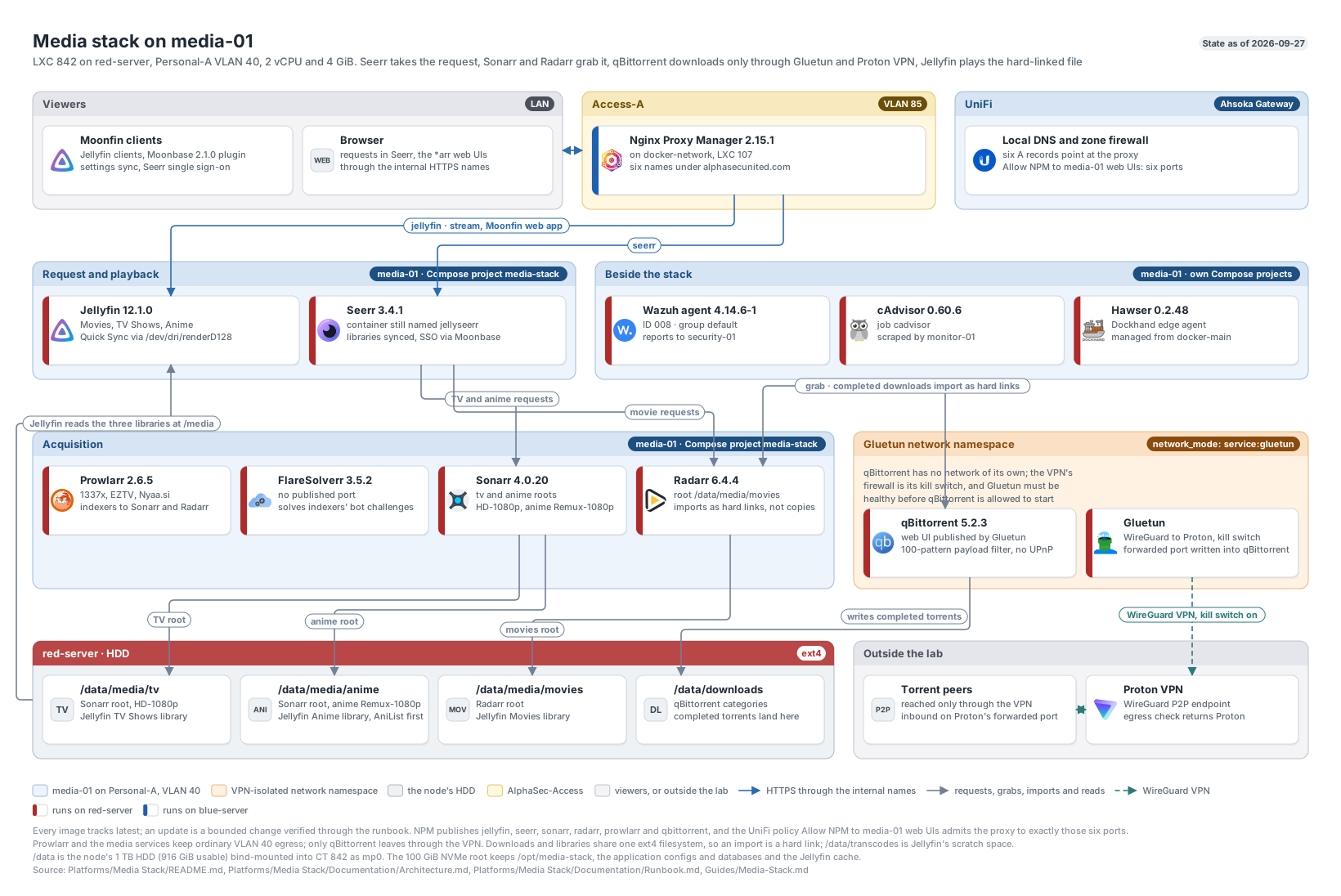
The media stack on media-01: the request path, acquisition through the VPN, and the single ext4 filesystem the libraries share. Click to enlarge.