Monitoring and alerting
Prometheus and Grafana on monitor-01, the 50 targets they scrape, the 23 Grafana alert rules, and the Discord bot that turns alerts from Grafana and Splunk into messages.
Prometheus and Grafana answer a different question from Wazuh and Splunk. Wazuh and Splunk carry security events, things that happened. Prometheus and Grafana carry states, things that are true for a while and then stop: a host is down, a disk is filling, a certificate is about to expire. Both sides deliver through the same Discord bot into one channel, styled so the class of a message is visible at a glance.
At a glance
| Item | Value |
|---|---|
| Host | CT 104 monitor-01 on blue-server, MONITOR-A, VLAN 73 |
| Prometheus | 3.14.0 in Docker, 15-day retention, administrative API disabled |
| Grafana | 13.2.2 in Docker, everything file-provisioned from the repository |
| Targets | 50 across six jobs, all up on 2026-09-27 |
| Alerting | 23 Grafana-managed rules in six groups. Prometheus holds no rules and there is no Alertmanager |
| Delivery | One Grafana contact point, the Discord alert bot on the same host |
| Dashboards | 27, all generated by a Python builder: ten topic dashboards and one per monitored host |
| Exporter versions | blackbox_exporter 0.28.0, pve-exporter 3.10.0, cAdvisor 0.60.6, PeaNUT 6.0.0; node_exporter 1.9.0 on 15 of 17 hosts |
| Scrape intervals | 15 seconds by default, 30 for cAdvisor and NUT, 60 for blackbox probes |
Versions were read on monitor-01 on 2026-09-24. Nine containers run on the host: Prometheus, Grafana, the Proxmox exporter, the blackbox exporter, the NUT exporter and the alert bot from the monitoring Compose project, plus cAdvisor, PeaNUT and the Dockhand agent from their own projects.
The stack started on security-01 beside Wazuh. On 2026-07-26 I moved it to CT 104 monitor-01, added the new host’s two exporters, and retired the old monitoring files and volumes.
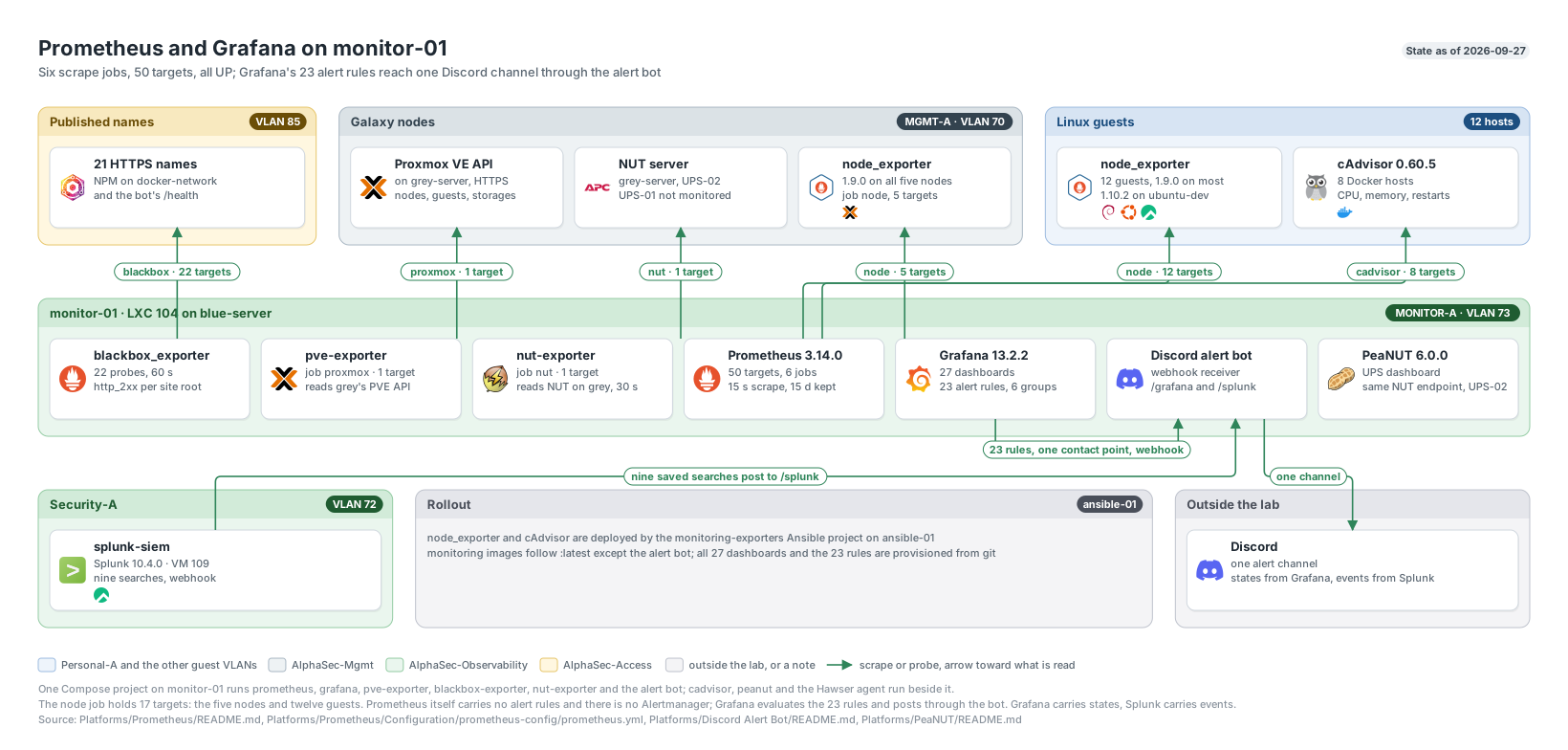
Prometheus and Grafana on monitor-01: the scrape jobs, their targets and the alert path to Discord. Click to enlarge.
Scrape jobs and targets
Jobs are named after the exporter type, with the hostname in a host label and a role label for dashboard filtering. Before 2026-07-25 there was one job per host, which made job double as a hostname and stopped scaling at 14 targets.
| Job | Targets | What it scrapes | Interval |
|---|---|---|---|
node | 17 | node_exporter on every running Linux host that carries a workload: the five Proxmox nodes, security-01, splunk-siem, edge-01, docker-main, ansible-01, docker-blue, media-01, app-01, alpha-prod-01, docker-network, monitor-01 and ubuntu-dev | 15 s |
cadvisor | 8 | Per-container CPU, memory and restarts on every Docker host: docker-main, docker-network, docker-blue, media-01, alpha-prod-01, app-01, security-01 and monitor-01 | 30 s |
blackbox | 22 | 21 internal service names probed through the reverse proxy, plus the alert bot’s own health endpoint | 60 s |
proxmox | 1 | The Proxmox API exporter, which covers every node, guest and storage in the cluster plus quorum | 15 s |
nut | 1 | UPS-02, an APC Back-UPS on grey-server, read over NUT | 30 s |
prometheus | 1 | Prometheus itself, so target health, scrape cost and TSDB growth are queryable from a dashboard | 15 s |
ubuntu-dev is in the node job with role=workstation and stays out of the cadvisor job, because its containers are throwaway builds.
The target count has moved with the lab: 7 before the 2026-07-25 expansion, 36 after it, 44 after UPS collection and the cAdvisor upgrade, 46 after the move to monitor-01, 49 once green-server joined on 2026-07-31, 50 when the bot’s health endpoint joined on 2026-09-02, 56 with What’s Up Docker, and back to 50 when I retired What’s Up Docker on 2026-09-27 because Dockhand already handles image checks and updates.
Exporters
node_exporter stays on the Debian package, 1.9.0, on 15 of the 17 hosts; ubuntu-dev runs 1.10.2 and docker-main 1.5.0. Upstream was at 1.12.1, so most of the fleet sits three minor versions behind on purpose: on 2026-07-26 I decided to keep APT owning the binary rather than move 13 more machines onto a pinned tarball for a version number. Exporters roll out from ansible-01 with idempotent playbooks that verify what they installed. The node_exporter play asserts the version the running exporter reports, and the cAdvisor play compares the containers cAdvisor registered against the containers Docker reports running and fails on a mismatch.
cAdvisor follows ghcr.io/google/cadvisor:latest. On 2026-07-25 it answered on six of seven Docker hosts with about 600 series each, all of them the root cgroup and none a named container. Docker 29’s default overlayfs driver moves layer metadata into containerd, and cAdvisor v0.52.1 could not resolve a container’s read-write layer, so it abandoned registration. I had wrongly concluded v0.52.1 was the newest release, because the three tags I probed were never published. v0.60.5 from the GitHub registry handles the containerd snapshotter, and the old registry stops at v0.55.1, so the image must not move back. The 2026-09-03 reconciliation registered all 69 running containers across the nine Docker hosts in scope then.
blackbox_exporter probes each internal service name through the reverse proxy, so a failure means the path a person actually uses is broken: local DNS, the proxy, the certificate or the backend. Every target is the service root, never a health endpoint. Probing the root is what caught the Arr apps answering an HTTPS request with an http:// redirect on 2026-09-18, which a /ping endpoint would have passed straight through.
The Proxmox exporter is one job for the whole cluster: every guest’s CPU, memory, disk and running state, all ten storages, node status and quorum.
The NUT exporter reads UPS-02. UPS-01’s data cable came off red-server during a UPS swap on 2026-08-28, its target sat down for three and a half days, and the only thing that noticed was me looking at a red panel. That outage is the reason the alert rules exist. red-server now draws power from UPS-02, so no UPS feeding a node went unmonitored, and UPS-01 stays commented out until the cable is back. Reaching NUT took rules in two independent firewalls: the UniFi policy alone was not enough, and the Proxmox cluster firewall also had to admit monitor-01.
Textfile collectors extend node_exporter without adding targets. Every host publishes pending APT or DNF upgrades, pending security upgrades and whether a reboot is required. The five nodes publish SMART health and NVMe data. alpha-prod-01 publishes TeamSpeak voice reachability from four UDP checks, so those series arrive under the node job.
Hardware panels are scoped to the machine that owns the hardware. node_exporter inside an LXC reports its node’s ZFS pools, NVMe data, sensors and disk statistics, because those come from /sys and /proc paths that are not namespaced. Unfiltered, one physical ZFS pool appears as three and one CPU’s sensors appear under seven hostnames. CPU package temperature joins on the sensor label rather than the chip name, because Intel reports the die as Package id 0 and AMD reports it as Tctl, and the old chip filter silently left out grey-server, the fleet’s one AMD node:
node_hwmon_temp_celsius * on (host, chip, sensor) group_left (label)
  node_hwmon_sensor_label{label=~"Package id 0|Tctl"} * 9 / 5 + 32
Grafana and the dashboards
Until 2026-07-25 the datasource and both imported dashboards lived only inside Grafana’s Docker volume, so removing that volume would have destroyed all of it. Now the repository holds the datasource, the dashboard providers, all 27 dashboards and the alert rules, mounted read-only into the container with allowUiUpdates off, so the repository stays authoritative. The datasource pins its name and UID so provisioning adopts the existing entry instead of creating a duplicate.
Every dashboard is generated by the builder in Tools/. A hand edit to the JSON is overwritten by the next build.
| Dashboard | Purpose |
|---|---|
| Homelab Overview | Eight health tiles, one table of everything failing a check, the fleet table, service reachability |
| Proxmox · Galaxy Cluster | Quorum, the five nodes, every guest, guest I/O, every storage |
| Containers | Every container across the cAdvisor hosts, with restart and out-of-memory tables |
| Uptime | 28 checks with status bars, sampled uptime against a 99.99 per cent target, and monitoring coverage |
| Services & Uptime | 23 probes: reachability, latency by request phase, TLS expiry |
| Storage & Drive Health | Capacity and days-to-full first, then NVMe, SATA SMART and ZFS |
| Network | Throughput, errors and drops, TCP state, connection tracking |
| Power & UPS | UPS-02 battery, runtime, load, mains and status flags |
| Monitoring Health | Target health, scrape cost, TSDB growth, the 17 node_exporters |
| TeamSpeak | Both servers, with a fault isolated to the server or to the path in front of it |
| One per host (17) | Status, CPU, memory, filesystems, disk and network, then whatever else that host has |
The per-host dashboards are real dashboards with their own UIDs, not a $host variable on a shared one, because a filter can only show what is true of every host. Capability flags in inventory.py decide which sections each host grows, so grey-server shows its ZFS pool and UPS, media-01 its containers and blue-server its NVMe. The flags exist because a panel built for a collector a host does not run draws an empty rectangle, and an empty rectangle reads as fine rather than not applicable. Two flags are deliberately narrower than the data: temperature and CPU frequency show only on the five nodes, because on an LXC they belong to the machine underneath.
A panel carries its number and nothing else: no prose bands, no sparklines in stat tiles, no legend tables. Colour is either state or resource. Tiles and table cells are coloured by thresholds, so green, amber and red keep their meaning, and a single-series graph wears its resource’s tint. Temperatures display in Fahrenheit, converted in the query so the thresholds move with them.
Alert rules
Before 2026-08-31 there was no alerting of any kind: Prometheus loaded no rule groups and knew no Alertmanager. I put the rules in Grafana rather than in Prometheus rule_files, because Prometheus can evaluate a rule but cannot deliver it without an Alertmanager, which is another container, another config and another secret. Grafana was already running with its scheduler active. Every threshold was checked against the live value on the day it was written and sits clear of it, so a fresh deploy fires nothing. An alert that cries wolf on day one gets muted by week two.
The 23 rules live in alphasec-united-alerts.yaml, grouped by what they watch.
| Group | Evaluated | Rule | Fires when | For | Severity |
|---|---|---|---|---|---|
| Availability | 1 min | Host is down | node_exporter on a host fails every scrape | 5m | critical |
| Availability | 1 min | Metrics source stopped reporting | Any other target is down while its host is still up | 10m | warning |
| Availability | 1 min | Internal service is unreachable | A blackbox probe fails | 5m | critical |
| Availability | 1 min | Proxmox node or cluster is down | Proxmox reports a node or the cluster down | 5m | critical |
| Availability | 1 min | VM or container is down | A guest that ran in the last two hours is now stopped | 5m | critical |
| Availability | 1 min | Container is restart-looping | More than three starts of one container in 15 minutes | 2m | warning |
| Capacity | 5 min | Filesystem is almost full | Above 85 per cent, excluding tmpfs, overlay, ZFS, FUSE and read-only image filesystems | 15m | warning |
| Capacity | 5 min | Proxmox storage is almost full | Above 85 per cent | 15m | warning |
| Capacity | 5 min | Memory is nearly exhausted | Above 92 per cent, measured against available memory | 15m | warning |
| Capacity | 5 min | Disk is saturated | A hypervisor disk busy above 95 per cent of the time | 20m | warning |
| Capacity | 5 min | CPU is pinned | Proxmox’s own CPU ratio above 0.9 for any guest or node | 15m | warning |
| Capacity | 5 min | Host is overloaded | A hypervisor’s 15-minute load above 2 per core | 15m | warning |
| Network | 1 min | Internal service is responding slowly | A probe that succeeds still takes over 5 seconds | 10m | warning |
| Network | 1 min | TLS certificate is expiring | A probed certificate ends within 14 days | 1h | warning |
| Power and hardware | 1 min | UPS is running on battery | NUT reports the UPS on battery | 1m | critical |
| Power and hardware | 1 min | UPS battery needs attention | NUT reports low battery, replace battery or forced shutdown | 5m | critical |
| Power and hardware | 1 min | Hardware is running hot | A hypervisor sensor above 80 C | 10m | warning |
| Storage health | 5 min | Drive failed its SMART health check | SMART overall health fails on a hypervisor drive | 15m | critical |
| Storage health | 5 min | NVMe drive reports a critical warning | Any NVMe critical-warning bit set | 5m | critical |
| Storage health | 5 min | NVMe drive is nearly worn out | Above 90 per cent of rated write endurance | 1h | warning |
| Updates | 15 min | Security updates are waiting | A host has a pending upgrade from a security origin, or any DNF security upgrade | 30m | warning |
| Updates | 15 min | OS updates are waiting | A host has pending upgrades and none of them is a security upgrade | 1h | info |
| Updates | 15 min | Host needs a reboot | A host has been patched and needs a reboot to finish | 30m | info |
A few choices in that table were made to keep the volume down:
- Guests. Some guests are stopped on purpose, so a plain “guest is down” rule would fire on load. The rule reads “was running within the last two hours and is stopped now”, and joins guest info so the alert names the guest and its node. A guest I stop myself fires once and clears itself two hours later.
- CPU from Proxmox. Proxmox’s CPU ratio is already relative to the cores a guest holds, so one rule covers 16 guests and five nodes without a per-host core count.
- Load on hypervisors only. lxcfs does not virtualise
/proc/loadavg, so guests report their node’s load. Unfiltered, one overloaded node would alert three times. - Drive rules on hypervisors only. The same SMART script inside a guest marks a virtio disk unhealthy for having no self-assessment.
- Empty is sometimes normal. The guest, certificate, UPS and Updates rules treat no data as OK, because their healthy state is an empty filtered vector. The rules over raw
uptreat no data as a problem, because empty there means Grafana cannot reach Prometheus.
Three rules needed fixing after they shipped:
- Metrics source stopped reporting could never fire. Its query filtered
up == 0, and a PromQL comparison keeps the sample’s own value, so the matched series carried 0 and a “greater than 0.5” evaluator could never be true. It had stayed silent through the very three-and-a-half-day outage it was written for. I dropped the filter and moved the evaluator to “less than 0.5”, matching its siblings, and verified it fires against a target forced down. - The latency rule fired on dead probes. A probe that times out reports its 9.5-second deadline as its duration, so every hard failure cleared the 5-second threshold and was described as a slow backend. Multiplying by
probe_successzeroes a failed probe and leaves the unreachable rule to report it at critical. - A read-only ISO tripped the filesystem rule. A Windows installation ISO on
grey-serverreported 100 per cent full. The rule now excludes UDF and ISO 9660.
Routing
Every alert goes to one contact point, a webhook into the alert bot. The root policy groups by folder and alert name, waits 30 seconds so a host going down arrives as one message rather than one per rule that noticed, flushes every 5 minutes and repeats a still-firing alert every 4 hours. A child route for the updates class groups by alert name only, waits 5 minutes so the whole fleet’s textfiles land first, flushes every 30 minutes and repeats every 8,760 hours, which in practice means never. A host that carries updates for a month produces one message when the condition appears and one when it clears.
Alerting provisioning is not re-read on an interval, so a rule change means validating every expression against the live Prometheus API, uploading the file and restarting Grafana. A clean restart is not proof: the log must show finished to provision alerting, all 23 rule UIDs must still be present, and no rule instance may hold an evaluation error.
The Discord alert bot
The bot is a small Python service, alert_bot.py, built into its own image by the monitoring Compose project. It runs as an unprivileged user in python:3.13-slim with discord.py 2.x and aiohttp 3.x, needs no privileged Discord intents, and only needs Send Messages and Embed Links in the channel. Before it existed Grafana had 15 rules and a root policy whose receiver was literally named empty, so every alert evaluated into silence. I chose a bot over a plain channel webhook so messages come from a real bot user and the same process can later answer commands.
How it relays
- From Grafana. Grafana posts its alert payload to the bot’s Grafana endpoint over the monitoring Compose network, with a shared secret as a bearer token.
- From Splunk. A saved search’s
webhookaction posts one result row to the bot’s Splunk endpoint. Splunk’s action cannot send a header, so the bot accepts that endpoint only fromsplunk-siem’s address and answers 403 to anything else, and a UniFi policy admits only that host to the bot. Docker preserves the client address on a published port, which I checked before relying on it. - Health. The health endpoint answers 200 only while the Discord session is ready, and Prometheus probes it through blackbox, so a dead bot trips “Internal service is unreachable” instead of silently swallowing every alert.
The shared secret and the bot token live in an untracked mode-0600 .env beside the Compose file and in the password manager, never in the repository.
What it formats
| Class | How it looks |
|---|---|
| Infrastructure | Coloured by severity: red for critical, orange for warning, blue for info |
| Security | Purple, title prefixed SECURITY |
| Updates | Blue, title prefixed UPDATES |
| Resolved | Green, whatever the class |
Only the three Updates rules carry a class label; the bot treats a missing label as infrastructure. Messages from Splunk are styled as security. Each alert becomes one embed showing a fixed set of labels when present (host, name, node, id, instance, mount point, device, disk, UPS and status), with Grafana’s folder name in the footer. When one webhook carries four or more alerts with the same name and status, the bot posts one condensed embed listing them, with the count in the title. That is what turned “sixteen hosts have security updates” into one message. Below four it posts one embed per alert, because a list of two is worse than two messages.
For Splunk, the bot splits the saved search name on its first -, so the source goes in the footer and the rest becomes the title. It shows source and destination addresses and ports, rule and signature, action and count, the Wazuh agent, rule ID, level and description, a watched file path, the VirusTotal permalink, the machine and its last-seen time for the silent-agent search, and the user for a login.
Discord’s limits
Discord rejects a whole message when any embed field passes 1,024 characters, the embed passes 6,000, or a URL’s host has no dot. I hit all three on 2026-09-02 and 2026-09-03. The first real Updates batch failed eight times over three and a half hours because Grafana’s silence link carries one matcher per label, and a container-image metric with fifteen labels pushed that field past 1,024 characters. The first real Splunk post failed because Splunk’s result link used a bare hostname. The bot now drops a silence link that will not fit, trims the description until the embed fits, and only attaches a URL it can validate. A message with a missing link still arrives; a rejected message never does.
A code review the same morning found that the first trimming function could loop forever once the description was down to a single ellipsis while the fields alone still exceeded the limit, which would have hung the event loop and every endpoint with it. It was rewritten without the loop and checked against five constructed cases.
Note: Test the first rule of a new class with the widest-labelled metric it will ever read, not the narrowest. The class styling had been proven with a two-label test rule.
Proving delivery
A delivery change is not complete until a throwaway rule has fired and its message has appeared in the channel. On 2026-09-02 a test rule built on vector(1) was posted one evaluation plus the 30-second group wait after it was created. A resolved message arrives at the next five-minute flush, not immediately, which I confirmed twice with a rule designed to clear on its own. The Splunk path was proven on 2026-09-03 with a real saved search, recorded on the Splunk page.
The deployment also exposed a network problem. My bursts of separate SSH connections from ubuntu-dev to monitor-01 started timing out at the handshake. UniFi Threat Management was matching ET SCAN Potential SSH Scan OUTBOUND and blocking them under its Scanning Activity policy, and it was the second time: an existing host exclusion for the reverse proxy host had been added for the same symptom. Instead of excluding another host, I excluded that one signature, which keeps every other detection live on the automation hosts, and removed the old host exclusion so that host is inspected again. Twelve SSH connections in two seconds then all succeeded.
Tests and tools
| Path | What it does |
|---|---|
Tools/build_dashboards.py | One function per topic dashboard plus node_dashboard() for the per-host set. Writes all 27 dashboards and Tests/allow-empty.json with only the standard library |
Tools/dashlib.py | Panel constructors, shared thresholds and colours, and the Grid that places panels. PCT_USED is the amber-at-80, red-at-95 threshold every capacity panel uses |
Tools/inventory.py | The 17 hosts, what each one is, and which collectors it actually runs |
Tools/uptime.py | Service inventory, freshness checks, status bars, sampled uptime and coverage for the Uptime dashboard |
Tests/assert_targets.py | Reads the live target API and requires the exact approved target set, every target up, with the right job and host labels, keyed on scrape URL |
Tests/assert_dashboard_queries.py | Runs every PromQL expression in every dashboard (1,466 across the 27 on 2026-09-15) and fails on any that errors or returns nothing unexpectedly |
Tests/assert_dashboard_layout.py | Offline check that no panels overlap or run past column 24, which Grafana accepts and then silently reflows |
Tests/test_uptime.py | Unit tests for the uptime collector, plus generated PromQL fixtures for promtool test rules covering failed probes, stale collectors, unknown time and a brief outage inside a history bar |
Tests/allow-empty.json | Panels that are correct when empty, generated by the builder so a panel designed to be empty registers itself |
The routine for a dashboard change is: edit the tools, run the builder, run the layout check offline, run the query check against Prometheus, upload, and wait 30 seconds for Grafana to re-read the provider directories. For a target change it is: edit the versioned prometheus.yml, check the candidate with promtool inside the container, write it, send SIGHUP, wait a scrape interval, and run the target assertion.
docker exec prometheus promtool check config /etc/prometheus/prometheus.yml
docker kill -s HUP prometheus
curl -fsS "$PROMETHEUS_URL/api/v1/targets" | python3 Tests/assert_targets.py
Warning: A successful file copy or a HUP signal is not proof of a reload. Until 2026-08-06
prometheus.ymlwas a single-file bind mount, which pins the inode at container start, and three separate reloads reported success while Prometheus kept serving the old configuration. The configuration now lives in a directory mount. Verify through the target API every time.
Retention and storage
Prometheus keeps 15 days of data, which also means the graph discontinuity from the 2026-07-25 job rename has aged out. Its data volume is about 5.2 GiB. On 2026-09-04 that left too little headroom on monitor-01’s 16 GiB root filesystem for retained containerd image generations, and root reached 96 per cent; pruning four dangling images reclaimed 4.021 GB and brought it to 70 per cent. It stood at 77.9 per cent against the 85 per cent rule at the last check, and it matters more than most hosts: if it fills, alerting dies with it.
Grafana’s SQLite database once logged 25 database is locked errors in ten hours from its own background jobs colliding. Setting WAL mode fixed it on Grafana 12, but on 13 the setting was inert and the database stayed in rollback-journal mode, so I removed the variable when the bot deployment recreated Grafana from the versioned Compose file. After a host restart on 2026-08-10, Docker had recorded Prometheus as manually stopped, so unless-stopped skipped it while every other container came back; Prometheus alone now uses restart: always.
Open work
- Collect UniFi gateway, switch and access point metrics. WAN throughput and per-AP client counts are the biggest remaining blind spot, and the exporter needs a read-only UniFi account, which deserves its own change record.
- Grafana stopped writing to its container log on 2026-09-09 while still serving queries and evaluating rules, and a restart did not bring the log back.
monitor-01’s root filesystem andgrey-server’s memory are both close to their alert thresholds without firing.- Finish a sweep for containers that started before their host’s DNS configuration was written. I checked 52 of 60 running containers and found none, and
security-01still needs checking.
Security events that reach the same bot come from the Splunk saved searches.