Splunk
Splunk Enterprise and Enterprise Security on splunk-siem, the three pipelines that feed it, the searches that post to Discord, and the end-to-end test that proved a malicious file shows up.
Splunk is where the lab’s security events meet. UniFi’s gateway events, UniFi’s per-connection flow records and Wazuh’s alerts all land in one instance, get mapped onto Splunk’s Common Information Model, and are searched on a schedule. Splunk is also the one thing that posts security events to Discord: Wazuh and UniFi notify nobody on their own.
At a glance
| Item | Value |
|---|---|
| Splunk Enterprise | 10.4.0, build f798d4d49089 |
| Enterprise Security | 8.5.1, installed 2026-07-02 on the same instance |
| Host | VM 109 splunk-siem on grey-server, Rocky Linux 10.2, 6 vCPU, 12 GiB memory, 150 GiB on ssd-lvm1 |
| Network | Security-A, VLAN 72, beside the Wazuh manager |
| Inputs | SC4S for UniFi CEF syslog, an HTTP Event Collector input for SC4S and the flow collector, and a receiving port for the Wazuh forwarder |
| Indexes in use | netops (UniFi events), netfw (UniFi traffic flows), wazuh (Wazuh alerts) |
| My apps | unifi_insights (CIM mapping, three dashboards, 11 saved searches) and wazuh_insights (one dashboard, 5 saved searches), among 65 installed apps |
| Discord | Nine saved searches, five UniFi and four Wazuh, post through the alert bot |
| Licence | Splunk nonprofit donation program: 10 GB a day of ingest, with an Enterprise Security entitlement and SOAR Community Edition included |
Versions were read on the host on 2026-09-24.
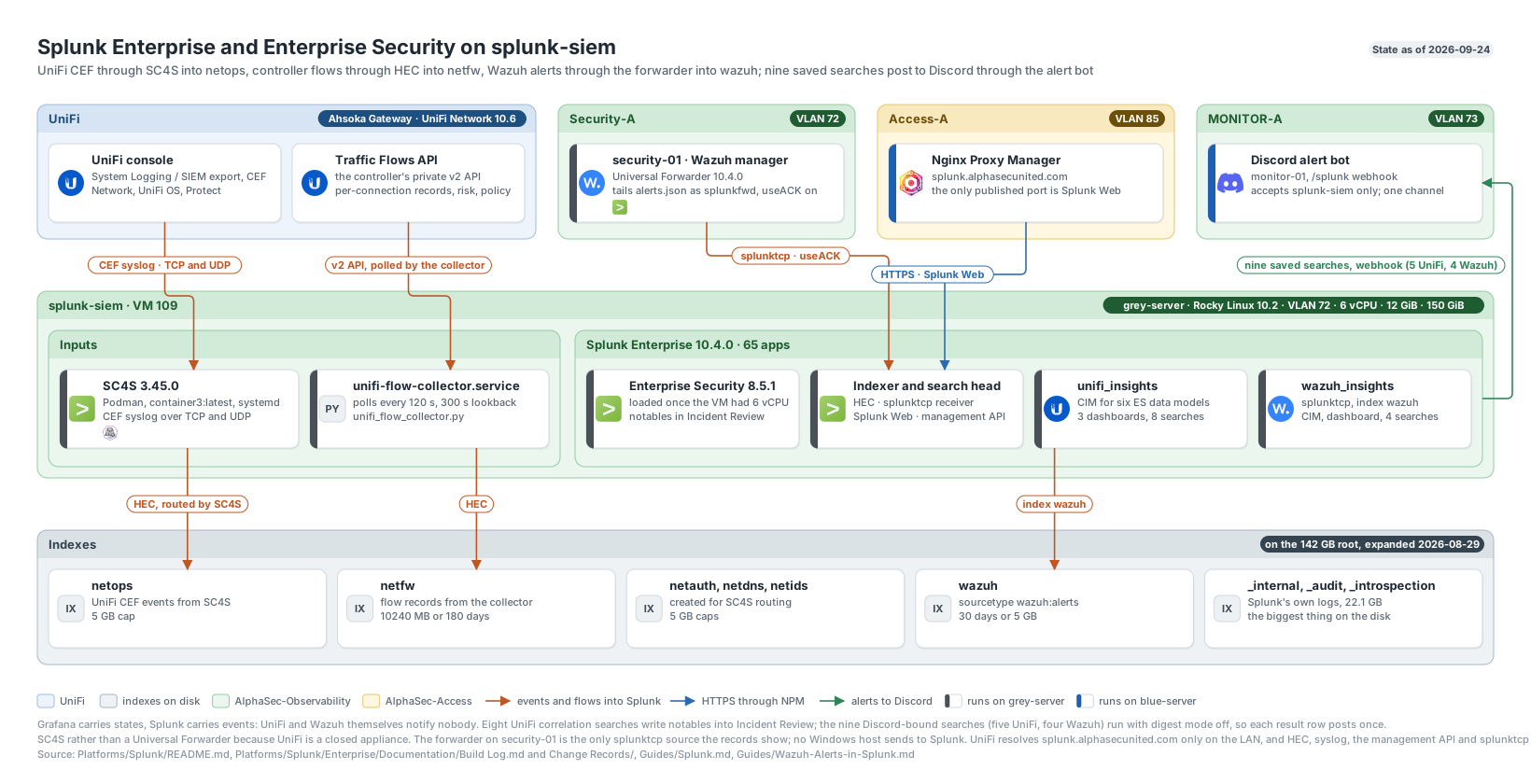
Splunk Enterprise and Enterprise Security on splunk-siem: inputs, apps, indexes and the alert path. Click to enlarge.
How data gets in
Three pipelines feed the instance, and they carry different things.
| Pipeline | Source | Carries | Lands in |
|---|---|---|---|
| SC4S | UniFi console, CEF over syslog | Threat detections, client connects and disconnects, VPN sessions, admin activity, device health, camera detections | netops, sourcetype cef |
| Flow collector | UniFi controller Traffic Flows API | One record per connection: action, risk band, matched policy, bytes, packets, destination domain and region | netfw, sourcetype unifi:flow |
| Universal Forwarder | Wazuh manager on security-01 | Every Wazuh alert | wazuh, sourcetype wazuh:alerts |
SC4S and UniFi CEF
UniFi’s System Logging / SIEM integration pushes Common Event Format over syslog. I ruled out a Universal Forwarder, because UniFi is a closed appliance with nothing to install one on, and I ruled out pointing syslog straight at splunkd, which Splunk discourages because a UDP listener drops events whenever Splunk restarts. Splunk Connect for Syslog (SC4S) is Splunk’s recommended pattern: a containerised syslog-ng that parses CEF natively, sets the Splunk metadata, and forwards over HTTP Event Collector, so a Splunk restart does not lose events.
SC4S runs in Podman under systemd from the container3:latest image (3.45.0 when I built it), with the kernel receive buffers raised to 16 MB. It listens for CEF on TCP and UDP and hands events to Splunk through HEC. The HEC token has no index restriction on purpose, because SC4S sets the destination index per event and a restricted token would drop anything aimed elsewhere.
Routing is a metadata override keyed on the CEF header’s vendor and product. My first attempt used one key and only part of the data moved, because UniFi emits three product strings when every category is enabled:
Ubiquiti_UniFi OS,index,netops
Ubiquiti_UniFi Network,index,netops
Ubiquiti_UniFi Protect,index,netops
I proved the routing by searching main over the same window and getting nothing back.
The flow collector
The syslog export carries events, not connections. The per-connection records behind UniFi’s Insights view come from the controller’s private v2 API, so unifi-flow-collector.service on splunk-siem polls it every 120 seconds over a window that reaches 300 seconds behind the last flow it saw. Late records are still picked up, repeats are dropped by flow id, and a checkpoint file means a restart neither re-ingests nor loses a window. Its credentials sit in a root-owned mode-600 environment file. The script emits CIM field names wherever the meaning matches, and it keeps the ips_category the controller attaches when an IPS signature classified a flow, which is the only place the reason for a high risk band is stated.
At steady state a poll reads like fetched=1268 new=261 written=261: it retrieved 1,268 records and recognised 1,007 as already seen, which shows the overlap and the de-duplication both working.
The Wazuh forwarder
A Universal Forwarder on security-01, the same 10.4.0 build as the indexer, tails /var/ossec/logs/alerts/alerts.json and ships it with useACK on, so the forwarder holds each event until the indexer confirms it was written. It runs as an unprivileged service account that is a member of the wazuh group, because alerts.json is mode 0640 and group membership is the whole reason it can read the file. Running a log shipper as root to skip one usermod would give it write access to the entire manager.
[monitor:///var/ossec/logs/alerts/alerts.json]
index = wazuh
sourcetype = wazuh:alerts
disabled = 0
Only the live file is monitored. Wazuh rotates alerts.json at midnight into dated folders, and pointing at the archive would have replayed months of history through a brand-new pipeline. Both hosts sit on Security-A, so the traffic never reaches the gateway and needed no firewall policy. The first four hours brought 914 alerts from 13 agents, and every agent was represented the next day.
The first real finding came from that first look. Systemd: Service exited due to a failure was 575 of the 914 alerts, 62.9 per cent of everything the fleet said, all from a NUT driver unit on red-server restarting every 25 seconds for a UPS whose data cable was no longer attached. I commented out its stanza on 2026-08-31.
Indexes and storage
netops holds the UniFi CEF events and is capped at 2,048 MB or 365 days. netfw holds the flow records and is capped at 10,240 MB or 180 days; at about 74 MB a day on disk the size cap rolls it first, after roughly 139 days. wazuh keeps 30 days or 5 GB, whichever comes first, and its definition lives inside the wazuh_insights app with the receiving port, so the input, the index and its retention uninstall together. The original build also created netauth, netdns and netids at 5 GB each for future SC4S routing, with main as the catch-all for anything unrouted. Enterprise Security added its own indexes, including notable with a 500,000 MB cap, risk, threat_activity and notable_summary.
I capped netfw and netops before turning the flow collector on, because a full disk would take the SIEM down. Licence was never the constraint: the controller reported about 391,000 flows a day, roughly 175 MB of raw JSON against a daily allowance of about 10 GB. Disk was. On 2026-08-29 Splunk had 24 GB free even though I had already grown the virtual disk to 150 GB, because Rocky’s installer had given half the disk to an rl-home volume holding 192 KB. XFS cannot shrink, so the volume had to go, and the obvious sequence locks you out: the SSH key I authenticate with lives under /home, and rebooting without the mount brings back an empty directory. I copied /home onto the root filesystem through a bind mount first, then removed the volume and grew root from 70 GB to 141.5 GB. Splunk’s own partition reading, not df, confirmed 94.9 GB free, and netfw and netops came through the reboot intact.
Note: Splunk’s own telemetry outweighs the data I collect.
_internal,_auditand_introspectionheld 22.1 GB against 99 MB of UniFi data on 2026-08-29, so they are the first thing to look at if disk gets tight.
UniFi IPS coverage
The UniFi threat events Splunk alerts on come from the gateway’s Threat Management. On 2026-08-30 I added DMZ (VLAN 30) to its Selected Networks, which took the list from six networks to seven: Trusted, IoT, Personal-A, Secure, Secure Client, MGMT-A and DMZ. The page then reported Intrusion Prevention on with 32,918 signatures. Detection Mode was Notify at first, which raises an alert and forwards the packet anyway, and I moved it to Notify and Block on 2026-08-31. It is one gateway-wide setting, so enforcement covers all seven networks. Eight of the fifteen routed LANs remain outside Threat Management as a throughput decision; one of them, Cluster-Net, carries only Corosync, which is the traffic least tolerant of added latency.
Making the data usable
Fixing the UniFi CEF parsing
CEF extension parsing splits key=value pairs on whitespace, so every UniFi value containing a space was truncated at the first one. ET TOR Known Tor Exit Node Traffic group 25 reached Splunk as ET, and the whole threat dataset had two distinct signature values, ET and GPL. I fixed it at search time rather than in SC4S, because a search-time extraction is reversible and does not risk the ingest path. Each value is re-read from _raw up to the next CEF key into a new field name. Signatures went from 2 distinct values to 41, and policy and device names became whole.
Two more faults appeared once UniFi OS and Protect were exporting again:
- UniFi OS prefixes its lines with a truncated ISO date before
CEF:0|. The header extraction was anchored with^CEF:, so it silently skipped one product of three. Removing the anchor fixed it. - The firewall event type matched
UNIFIcategory=Security, which covers detections as well as blocks, so 11,819 IDS detections were being counted as connections in Network_Traffic alongside 25 real firewall blocks. It now matches class 203 only.
Severity had read informational on every non-threat event, because the mapping only read the risk field that threat classes carry. It now falls back to the CEF header severity:
| Event | CEF severity | CIM severity |
|---|---|---|
| Internet Down | 10 | critical |
| Device IP Address Conflict, Device Offline | 8 | high |
| Device Power Cycled, Internet Restored | 6 | medium |
| High Latency Detected, Packet Loss Detected | 4 | low |
| AP Channel Change | 2 | informational |
Forty of 41 event classes carry an event type. The one left untyped is UniFi OS class 1, the console’s Send Test Event button, because typing it would put a test into a data model as a real event. Six Enterprise Security data models now carry UniFi data: Network_Traffic, Intrusion_Detection, Authentication, Network_Sessions, Change and Alerts.
No existing add-on covered this. SC4S’s Ubiquiti support and the community add-ons target the legacy BSD syslog format, and the UniFi Cloud add-on has no traffic flows, no CIM mapping and does not support Splunk 10. That is why unifi_insights exists.
Mapping Wazuh alerts
props.conf for wazuh:alerts uses KV_MODE = json, raises TRUNCATE to 32,768 so a long package list does not cut the JSON mid-object, and takes the timestamp from the alert itself. Aliases put the agent name on dest, the source address on src and the rule description on signature. Seven event types key on rule.groups{} rather than rule IDs, because IDs change between releases and when a local rule overrides a stock one.
Two mapping mistakes were invisible until I looked at what Enterprise Security did with the result:
object_categorywas set tofileunconditionally, which tagged 905 of 925 non-file events into the Endpoint Filesystem data model. It is now conditional on a syscheck path or a package field.- The malware macro matched the whole
virustotalgroup, which includes rule 87101 for a rate-limit refusal and 87103 for a file VirusTotal has never seen. The tile read 2,941 when the true number was 2. Only 87105 carries a malicious verdict, so the macro keys on that field:
[wazuh_malware_found]
definition = index=wazuh sourcetype=wazuh:alerts ("data.virustotal.malicious"=1 OR "rule.groups{}"=known_bad_hash OR "rule.groups{}"=trojan OR "rule.groups{}"=rootkit)
A product’s own operational messages sit in the same group as its findings, and a group match cannot tell them apart.
The saved searches
The two apps hold 16 saved searches. Eight UniFi correlation searches write notables into Enterprise Security’s Incident Review, and nine searches post to Discord. Two searches do both.
The nine that post to Discord
| Search | What it detects | Schedule | Suppression |
|---|---|---|---|
| UniFi - Intrusion detection not blocked | An IPS signature matched and the gateway let the traffic through, excluding classes other rules already report | Hourly at :12 | 6 hours per source and rule |
| UniFi - Threat reputation or malicious user agent match | A match on a reputation list, a malicious user agent, Malware or Exploit Kit, on a single hit | Hourly at :17 | 4 hours per source and rule |
| UniFi - Intrusion detection blocked | The IPS stopped something, one message per source per hour | Hourly at :47 | 1 hour per source and rule |
| UniFi - Internal host blocked repeatedly | A host on a server or workstation VLAN had 20 or more flows denied inside ten minutes | Every 10 minutes | 1 hour per source |
| UniFi - Syslog export has gone quiet | No UniFi event of any kind in six hours | Hourly at :52 | 24 hours |
| Wazuh - Malware or high severity | Anything Wazuh scored 12 or above, plus any malware verdict: VirusTotal, a known-bad hash, a rootcheck trojan or rootkit | Every 15 minutes | 1 hour per machine and rule |
| Wazuh - Account or group changed | A user or group added, removed or changed, which is also where a user being put into sudo or wheel lands | Hourly at :57 | 1 hour per machine |
| Wazuh - Login from outside private networks | A successful login from an address that is not private, loopback or link-local | Hourly at :02 | 24 hours per machine and source |
| Wazuh - Machines gone quiet, listed | An agent that reported in the last 7 days and has been silent for 24 hours | Hourly at :05 | 7 days per machine |
Every one was dispatched over 30 days of history before it was enabled. That history would have produced 8 source-and-rule pairs for the not-blocked rule, 7 for the reputation rule, 4 for the blocked rule, none for internal denies (the busiest pairing was 33 denies in the whole month), none for a quiet syslog export, 2 malware results (both the EICAR test file), 7 account changes on 3 machines (all mine), no off-network logins and no silent machines. The goal for the whole alerting setup, Grafana included, is fewer than ten messages in a quiet week.
The tuning behind those numbers:
- The not-blocked rule matched 38 pairs before tuning. Most were Tor traffic from one PC, which the Tor rule covers, and web-infrastructure signatures raised by my own reverse proxy reaching my own services; the rest were scanning from my admin hosts, which the scanning rule covers. Excluding those classes still leaves each of them in Incident Review through its own rule.
- The blocked rule would have been 41 source-hours in 30 days unfiltered. It excludes P2P and Tor, the reputation rules that already post, scanning from
ansible-01(probing managed hosts is its job) and the reverse-proxy pairing. - Internal denies count only the server and workstation VLANs: 30, 40, 70, 72, 73, 80 and 85. Trusted, VLAN 50, is left out on purpose, because its denies are phones and TVs.
- The syslog dead-man window is six hours because the 30-day history had a four-hour block with zero UniFi events, and the quietest six-hour block held 13. The export had broken silently once before, when the console’s SIEM server address was cleared, and every other UniFi rule returns nothing rather than something when that happens.
- Level 12 is the Wazuh floor because only the two EICAR detections reached it in 30 days. The systemd failure flood never gets near it.
- The silent-machine search excludes one stale manager identity only while its last event predates 2026-09-02, so the exclusion expires by itself and cannot hide a later host with the same name. I proved it both ways: the search returns no rows, and moving the cutoff a day earlier returns the stale identity.
On 2026-09-12 I traced a Discord alert for an outbound scan signature from ubuntu-dev, which turned out to be my own RDP verification sweep. It showed that ubuntu-dev had sat in the blocked rule’s scan exclusion as an address and had never matched, because the source field carries the UniFi client name whenever the controller knows one. I chose to drop the exclusion and alert on scans from that host rather than repair it.
The notable-only correlation searches
Six of the eight Enterprise Security correlation searches write notables and nothing else, because they were tuned for a queue rather than a phone:
| Search | Severity | What it detects |
|---|---|---|
| UniFi - Outbound scanning activity | high | A host producing five or more outbound scan signatures, which is what a compromised machine looks like from the gateway; ansible-01 excluded |
| UniFi - Tor network traffic | low | A host reaching a Tor relay or exit node |
| UniFi - Blocked inbound flow spike from a single source | medium | One outside address with 25 or more blocked flows in 15 minutes, against a baseline of about 120 a day in total |
| UniFi - Controller configuration changed | informational | A configuration change by a person; the controller’s built-in service accounts made 534 of 767 changes and are excluded |
| UniFi - Admin console access from an unexpected network | medium | Console access from outside the known administrative networks |
| UniFi - P2P signature activity from a new host | low | Ten or more P2P detections in an hour from a host that had none in the previous week |
P2P gets its own rule because 10,849 of the 11,477 detections on record were the P2P signature set firing on the network’s own BitTorrent traffic. Alerting on UniFi’s high-risk band as-is would have made the notable queue about 95 per cent torrent noise, so the threat rules exclude P2P by name and this rule fires only if P2P activity moves somewhere new. The searches run on staggered minutes so they do not contend for search slots at the top of the hour. On 2026-08-29 the scheduler ran the eight rules 150 times in 24 hours with every execution successful, and seven notables were in index=notable from three rules at the severities they declare.
The fifth Wazuh search, Wazuh - Machines gone quiet, is unscheduled. It returns the count the dashboard tile shows.
Dashboards
All four dashboards are Dashboard Studio views. The UniFi ones are generated by a script, build_unifi_dashboards.py, rather than edited by hand.
| App | Dashboard | What it answers |
|---|---|---|
unifi_insights | UniFi Flow Insights | Totals, blocked and high-risk flows, countries reached, flow rate by disposition, a world map of destinations, busiest clients and services, the zone-to-zone matrix |
unifi_insights | UniFi Threat Center | Detections, blocks and pass-throughs over time by risk, signatures by frequency, threat categories, where blocked traffic originates, blocking policies |
unifi_insights | UniFi Client and Network Activity | Active clients, connects and disconnects, configuration changes and admin logins, the WiFi split, plus network health and camera detections |
wazuh_insights | Wazuh Insights | Seven glance tiles that should read zero or close to it, then alerts over time by machine, the VirusTotal lookup budget, most-changed files, logins and the whole stream |
The Wazuh dashboard’s top strip is built around one question: if something bad arrived on a machine, would this page show it?
| Tile | What it counts | Window |
|---|---|---|
| Machines gone quiet | Agents seen in 7 days that have said nothing for 24 hours | 7 days |
| Malware found | A local hash match, or VirusTotal reporting detections | 24 hours |
| Off-network logins | Successful logins from outside private address space | 24 hours |
| Watched files changed | File-integrity events across every agent | 24 hours |
| Scheduled task changes | Changes under cron and systemd unit directories | 7 days |
| Software added or removed | Package manager activity | 7 days |
| Listening port changes | A machine started or stopped listening on a port | 7 days |
Quiet agents cannot be derived from alert volume, because a healthy machine with nothing to report sends nothing. The tile is “seen in the last 7 days, silent for the last 24”, which separates a machine that stopped talking from one that was never enrolled.
Splunk Web was firewalled from my workstation during the UniFi build, so instead of skipping the visual check I rendered each dashboard server-side through Splunk’s PDF renderer and read the output. That caught four faults a query test cannot: a choropleth visualisation that is not registered on this instance, an unescaped ampersand that truncated a label, a donut that merged two risk bands and handed their colours to the wrong one, and raw field names as column headers. Geography is now drawn with a map over iplocation coordinates, and the time charts emit fixed named columns because seriesColors binds by position and a missing series shifts every colour after it.
Three Dashboard Studio behaviours cost time on the Wazuh page. One malformed multiselect input rendered Layout undefined is not defined and took the whole page down rather than one control. A panel can pin its own time window by writing earliest=-7d latest=now in the search, which Splunk confirms with Your timerange was substituted based on your search string. And _time renders as a timestamp only while it is still called _time, so the tables format it with strftime after sorting.
Tests/verify_unifi_insights.py reads the deployed views and savedsearches.conf off disk and runs everything it finds, so it does not go stale when a panel is added. It takes credentials from a netrc file so the password never reaches a command line, and writes nothing. Its last recorded run passed 39 of 39 panel queries, ran all eight correlation searches over their production windows, and confirmed seven of them match real data over 60 days. The eighth, P2P from a new host, correctly returned nothing.
Discord notifications
Delivery is Splunk’s stock webhook alert action posting to the Discord alert bot on monitor-01. The action cannot send a header, so the bot accepts its Splunk endpoint only from splunk-siem’s address, and a UniFi policy admits only that host to the bot. alert.digest_mode = 0 on every Discord-bound search makes Splunk run the action once per result row, so a search grouped by source produces one message per source and suppression applies per source too.
Three things went wrong during the 2026-09-03 rollout:
- My first draft of the blocked rule used
rule NOT IN (...), which Splunk rejects; the working form isNOT rule IN (...). I caught it by dispatching every new search once with actions off before enabling anything. - A REST read I made with
curl -dwas actually a POST, and it left an empty[webhook]stanza in the search app’s localalert_actions.conf, so the first trigger could not find the action’s script. - Discord refused the first post that reached the bot, because Splunk built the result link from its bare hostname and Discord requires a dot in a URL’s host. Both apps now set
hostnameinalert_actions.confto the name the reverse proxy publishes Splunk Web on, and the bot validates every URL.
The end-to-end malware test
The goal of the whole Wazuh-to-Splunk build was one question: if somebody downloads a malicious file onto a machine in this lab, does a page in Splunk show it?
On 2026-08-30 I wrote the EICAR test string into a watched downloads folder on ubuntu-dev and let the chain run. VirusTotal rule 87105 and local hash rule 100200 fired one second apart on the same file, both at level 12, and both were searchable in index=wazuh about ten seconds later. The Malware found tile then read 4: the same file caught on two occasions, each raising two independent alerts, instead of the 2,941 the uncorrected macro had shown.
The notification half was proven on 2026-09-03. At 3:04:13 AM I dispatched Wazuh - Malware or high severity over ten days with actions enabled. The scheduler recorded two results and no suppression, sendmodalert ran the webhook once per row with HTTP 200 and exit code 0 each time, and the bot posted both as SECURITY Malware or high severity one second later: once from the local hash list and once from VirusTotal, which is the right pair of messages for that file.
Enterprise Security
I installed Enterprise Security on 2026-07-02 by uploading the package through Splunk Web, because this is one search head and the web path runs the post-install index and data-model work. That work stalled at 4 vCPU. It looked disk-bound at first, but it was CPU-bound, and raising the VM to 6 vCPU let setup finish and the configuration pages load. The nonprofit licence already covered Enterprise Security, so no separate purchase or licence file was needed.
Today it carries the UniFi data in six data models, the Wazuh data through wazuh_insights, and the eight correlation searches writing to Incident Review.
Build notes
The VM is a full guest rather than an LXC or a container, because Splunk’s documented tuning needs Transparent Huge Pages off and higher open-file and process limits set at the guest OS level. I installed Rocky Linux minimal with no desktop, updated it, set SSH to key-only with root login disabled, and tested a second key session before closing the first. Splunk runs as a dedicated service account, never root, and enable boot-start -systemd-managed 1 generates a unit that applies the THP and limit settings the supported way.
The build’s troubleshooting index holds nine records. The early ones are the ordinary ones: an rpm -i run without sudo, the splunk command missing because that install had failed, an SC4S unit file that was never created, SC4S crash-looping because a leftover Splunk TCP input from an earlier direct-ingest attempt held its listener port, a search returning nothing because the time picker was set to real-time, and a test event that looked missing because I searched the wrong sourcetype.
Open work
- Review Enterprise Security roles and capabilities.
- Set up Risk-Based Alerting, so low-fidelity matches accumulate risk against a host instead of each raising a notable.
- Populate the Asset and Identity framework, so notables resolve to named hosts rather than bare addresses.
- Alert on changes under
~/.ssh,/usr/local/bin,/optor systemd unit directories once more Wazuh agents have real file watches. - Add the Rocky host’s own OS logs and the Proxmox host logs as data sources.
- Give
wazuh_insightsa verification script like the UniFi one, which would have caught the malware macro counting rate-limit errors. - Break high-risk flows down by
ips_category, and add a machine and severity filter to the Wazuh dashboard.
The Wazuh side of this pipeline is on the Wazuh page, and the bot that delivers the messages is on the monitoring page.