Incident response
The six-step process I follow for a service-impacting or security incident, how I rate and evidence it, and how the written report is structured and stored.
I use one sequence for anything that takes a service down or touches a security boundary, whether it started as an alert, a user report or something I noticed in passing. It has six steps. The last one closes the incident only after the old path has been shown to fail, not when the new one starts working.
Incident or troubleshooting
Routine troubleshooting is not an incident. A failed package install or a misread search result gets a dated troubleshooting record with the platform that owns it. A problem becomes an incident when it causes an outage people notice, exposes something that should not have been reachable, or puts a credential somewhere it should not be. When a troubleshooting record turns into an incident, I write the incident report and cross-link the two, so neither is a dead end.
The six steps
| Step | Name | What it produces |
|---|---|---|
| 1 | Define scope and impact | Affected assets, start time, symptom and user impact, before any change |
| 2 | Preserve the timeline | Provider, service, DNS, firewall, authentication and my own actions, in order |
| 3 | Contain the active path | The narrowest action that stops the current risk and keeps the evidence |
| 4 | Correct the configuration | Rotated access, removed legacy entries, repaired targets |
| 5 | Verify service and security state | Proof that the new path works and the old one fails |
| 6 | Record residual risk and close | The report, with every follow-up and the condition that closes it |
Step 1: Define scope and impact
Before changing any state, I write down the affected assets, the start time, the symptom and the known user impact. Confirmed facts are kept apart from working hypotheses. What I need at this point is the first observed time, the affected service, the user-visible symptom and who reported it, plus the provider dashboards, service logs and DNS, firewall and authentication records, and a list of every system that can reach or trust the affected component.
Step 2: Preserve the timeline
Provider events, service logs, DNS changes, firewall changes, authentication events and my own actions all go into one timeline in timestamp order. I keep the original time zone beside each entry, because the sources disagree. Wazuh’s own log mixes local and UTC timestamps, and the Windows recovery environment stamps its files in UTC, so the reports convert explicitly and say which clock they used.
Step 3: Contain the active path
I disable the exposed integration, route, account or key that creates the current risk, choosing the narrowest action that stops it without erasing the data needed for the root-cause check. Containment is not always a change. For the Action1 alert, the operations had already succeeded and the right containment was none: reproducing them would have added a mutation without establishing a need.
Step 4: Correct the configuration
I rotate affected access, remove legacy entries, repair the DNS or service target and update every dependent service. Before editing a configuration file, I copy it. One successful save is not enough: the old value or route has to fail after the new one works.
Step 5: Verify service and security state
I repeat every path that defines recovery: the user path, the backend path, the authentication check, the DNS lookup and the provider status. For the TeamSpeak public voice outage that meant the SRV chain, the public endpoint, the UDP voice path, the local container and the management view. Verification needs an observed result, not a successful command submission. After the Grafana credential was rotated, the check was that the removed value no longer authenticated; after the Vercel response, that only the new keys were listed and the legacy key read disabled.
Step 6: Record residual risk and close
I list each follow-up with the condition that closes it. An incident closes only when the service is stable, the exposed path is disabled, the verification results are recorded, and any remaining risk has a bounded next action. Several reports stay open on purpose. The TeamSpeak reports stay at Resolved / Monitoring and Mitigated because the external-user confirmations they asked for were never recorded, and the Vercel report stays open on one precautionary token rotation.
Warning: If a containment change makes the impact worse, restore the last known-good service route while keeping the exposed identity disabled. When one rollback cannot safely restore both availability and the security correction, split them and recover availability separately.
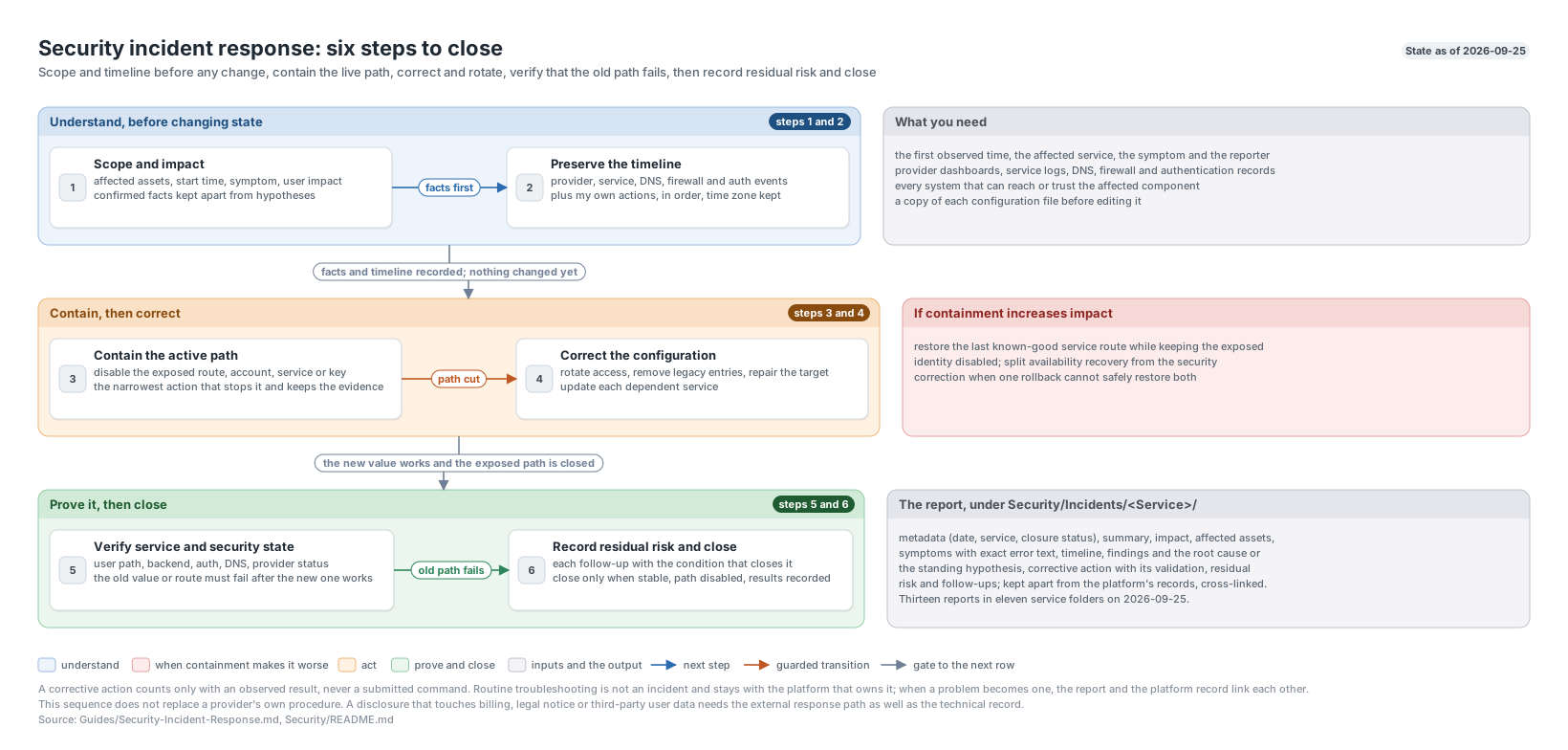
The six steps from scope to close.
How incidents were detected
The reports so far show that detection comes from everywhere, which is why the process does not assume an alert started it.
| Source | Reports |
|---|---|
| A user report | TeamSpeak public voice outage, qBittorrent Arr client outage |
| A Discord alert from Splunk | Action1 remote service control alert |
| Noticed during other work | Wazuh manager outage, Grafana plaintext credential, LAN-exposed preview server, Splunk credential printed |
| Planned or scheduled maintenance | HA local-storage stranding, blue-server duplicate volume group, Nginx Proxy Manager update |
| A vendor bulletin | Vercel credential rotation |
| Physical observation | ObiPC wiped from the recovery menu |
| An authorized exercise | ObiPC physical access simulation |
Severity
Each report carries a severity in its metadata. I have not written formal definitions for each level; the labels below are how they have been applied so far, and no report has used SEV-1.
| Label | Applied to |
|---|---|
| SEV-2 | Service outages: HA local-storage stranding, blue-server duplicate volume group, TeamSpeak public voice outage, Nginx Proxy Manager stranded by an update |
| SEV-3 | Degradation or potential disclosure: TeamSpeak DNS and ServerQuery, the qBittorrent Arr client outage, the LAN-exposed preview server |
| SEV-4 | The Grafana plaintext administrator credential, ObiPC wiped from the recovery menu |
| SEV-5 | The Splunk administrator credential printed into a tool session |
| Informational | The ObiPC physical access simulation, an authorized exercise |
| Not assigned | The Vercel credential rotation, the Wazuh manager outage, the Action1 IPS alert |
Alongside severity, each report states an impact type, such as availability, potential credential disclosure with no confirmed use, or loss of agent event collection. The impact type is often the more useful field, because it says what the reader should worry about.
Evidence handling
Evidence sits beside the report it supports, under Incidents/<Service>/Evidence/<Job - YYYY-MM-DD>/ or Assessments/Evidence/<Job - YYYY-MM-DD>/, split into Logs/, Screenshots/ and Exports/, with an Evidence-Index.md where the job has one. Most evidence stays on local disk; only allow-listed files are published. The rules I follow:
- Record what was not kept. If I summarized a diagnostic without retaining the raw transcript, the report says so. If a start time was not retained, the timeline says “start not retained” rather than guessing.
- Export selected fields, not everything. The physical access exercise kept selected-field JSON exports, the exact queries, exit codes and stderr, a record of a rejected query, and a
SHA256SUMS.txtintegrity manifest. It states plainly that this is not a forensic acquisition: no EVTX, memory or disk image was taken. - Sanitize before results come back. In the ObiPC reviews, names, directory identifiers and user-profile paths were excluded before results were returned. Credentials appear in reports only as redaction placeholders.
- Copies before edits. A configuration file I am about to change is copied first; when the copy holds no secrets it is kept in the repository’s
Backups/folder and deleted from the host. - Never read a credential to learn something about it. The Splunk credential incident came from printing a netrc file to check its scope. Metadata answers those questions:
ls -lfor mode and owner,wc -lfor shape,cut -d' ' -f1for keys. When I need to prove a value is gone, I sweep for it by piping the comparison value from the password manager, so it never reaches a command line or a file.
The report
Step 6 produces the report. Reports follow one structure, so a reader can find the same thing in the same place every time:
# <Title>

## Incident Metadata

| Field            | Value                                           |
| ---------------- | ----------------------------------------------- |
| Incident ID      | ASU-<SERVICE>-YYYYMMDD-NNN                      |
| Detected         | <date and time, or "exact minute not retained"> |
| Mitigated        | <date and time>                                 |
| Status           | <Closed, Resolved, Mitigated, Monitoring>       |
| Severity         | <SEV-n, Informational, or Not assigned>         |
| Impact type      | <availability, potential disclosure, ...>       |
| Affected service | <service and host>                              |

## Summary

## Impact

## Affected Assets

## Symptoms

## Timeline

## Findings

## Root Cause

## Corrective Action

## Validation

## Lessons

## Follow-Ups

## Closure

## Linked Records
What each part carries:
- Metadata: the date, the affected service, the closure status, severity and impact type. Older reports use platform-specific IDs such as
GLXY-INC-for the Galaxy cluster andTS3-INC-for TeamSpeak. - Summary: something a reader can take in without the detail below it.
- Impact: what stopped working and for whom, and what was not affected.
- Affected assets: the hosts, guests, networks and accounts in scope.
- Symptoms: including the exact error text where I captured it.
- Timeline: where I have the timestamps to build one, with the time zone stated.
- Findings, then the root cause: or the standing hypothesis when I never proved one. Several reports also list what was ruled out.
- Corrective action and validation: what I changed and the observed result that shows it worked.
- Residual risk and follow-ups: each with its status, and a closure line saying whether the report is finished.
Reports are edited forward, not rewritten. When a later change supersedes a follow-up, the report gains a dated line saying so, and the original text stays as the record of what was true when it closed.
Where reports live
| Location | Contents |
|---|---|
Security/Incidents/<Service>/ | Incident reports, one folder per service, even when the service keeps its own records elsewhere |
Security/Assessments/ | Read-only reviews and audits that are not incidents |
Archive/Security/Incidents/ | Incidents for retired platforms |
Security/README.md | The index: date, service, report, severity and status for every incident, and every assessment |
Keeping incidents under Security/ rather than with each platform means an incident is findable whether I go looking by service or by date. On 2026-09-27 the index held 14 incident-format reports across 11 service folders, including one authorized exercise, 4 assessments and 1 archived incident. Every one of them is summarized on the incidents page.
Limits
This process does not replace a provider’s own incident procedure. A disclosure involving billing, legal notice or third-party user data needs the applicable external response path in addition to the technical record.