Linux host baseline
The state every Linux guest reaches before it carries a workload. One administrative account, key-only SSH, no root login over SSH, a sudo prompt that asks for root's password, and passwordless sudo reserved for the automation account.
I apply this baseline to a Linux VM or LXC before it carries a workload. The finish line is a patched host with one administrative account, three authorized SSH public keys, key-only SSH, root that cannot log in over SSH, a sudo prompt that asks for a password other than the login password, passwordless sudo for automation only, and consistent time and locale.
docker-network (CT 107) is the recorded reference build. I applied the same baseline to media-01 (CT 842) when I built the media stack, The password and sudo parts were rolled across the rest of the fleet with the Ansible host access baseline project in August 2026.
Scope
The baseline covers the Linux guests in the host access model. On 2026-09-07, when I verified it, that was eleven guests:
| Guest | Kind | Notes |
|---|---|---|
alpha-prod-01 | VM | TeamSpeak host |
app-01 | VM | Coolify host; last guest to lose root SSH, on 2026-09-07 |
edge-01 | VM | |
security-01 | VM | Wazuh |
splunk-siem | VM | The one Rocky Linux host; its admin group is wheel, not sudo |
docker-blue | LXC | |
docker-network | LXC | Reference build |
monitor-01 | LXC | Prometheus and Grafana |
media-01 | LXC | Media stack |
game-01 | LXC | Retired on 2026-09-12 |
ansible-01 | LXC | The automation controller |
Some hosts sit outside the model on purpose. The five Proxmox nodes take root access through the cluster’s shared key file, not a POSIX account. docker-main stays a root-login-only, keyed host with no separate admin account. ubuntu-dev is a single-account workstation. Windows hosts follow their own records.
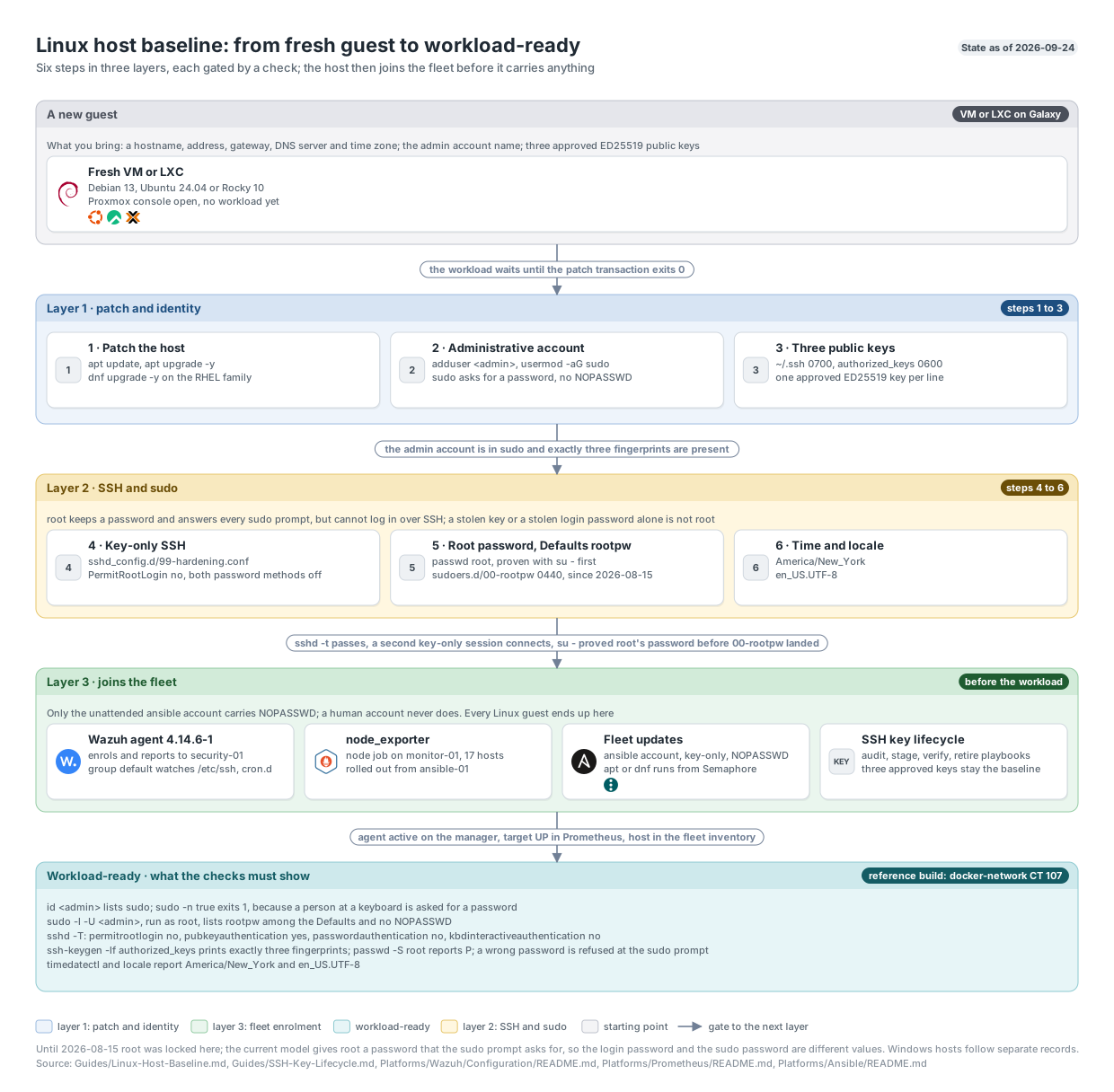
The six steps in three layers, each gated by a check, from the repository’s diagram set. Click to enlarge.
Step 1: Patch the host
apt update
apt upgrade -y
On an RHEL-family host I use dnf upgrade -y. I don’t install the workload until the package transaction exits 0.
After the build, patching moves to the fleet os-update.yml playbook, described on the automation page. The most recent fleet pass was on 2026-10-02. It covered all twelve running Linux guests: eleven through the playbook and ubuntu-dev by hand, with reboots left in report-only mode.
| Guest | Packages installed or upgraded | Result |
|---|---|---|
alpha-prod-01 | 60 | Newer kernel installed |
ansible-01 | 53 | Semaphore active |
app-01 | 70 | Newer kernel installed |
docker-blue | 69 | Containers running |
docker-main | 19 | Application containers running |
docker-network | 54 | Proxy and NetBird containers running |
edge-01 | 53 | Newer kernel installed |
media-01 | 53 | Media containers running |
monitor-01 | 53 | 50 of 50 Prometheus targets up |
security-01 | 74 | Wazuh central stack upgraded to 4.14.8-1 |
splunk-siem | 82 | DNF: 77 upgrades and 5 kernel-package installs |
ubuntu-dev | 43 | Newer kernel installed |
Every guest kept its boot ID, all eleven APT guests passed dpkg --audit and apt-get check, and Rocky passed dnf check. Six VMs were left with a newer kernel installed than the one running, so a reboot window was still open after that pass. The LXCs share their node’s kernel. Existing wazuh-agent package holds stayed in place.
Step 2: One administrative account
adduser <admin>
usermod -aG sudo <admin>
Group membership is the whole policy. %sudo ALL=(ALL:ALL) ALL already ships in /etc/sudoers, so the account gets sudo and is asked for a password. Step 5 makes that password root’s rather than its own.
I don’t write a NOPASSWD drop-in for a human account. Automation needs one because it runs unattended, and a person at a keyboard doesn’t. It also means a stolen key on its own is not root.
Step 3: Three public keys
The admin account’s ~/.ssh/authorized_keys holds one complete ED25519 public key per line, for the three approved identities. The directory is 0700, the file is 0600, and both are owned by the account. The keys themselves are managed by the SSH identity automation once the host joins the inventory.
Step 4: Key-only SSH, no root login
I write /etc/ssh/sshd_config.d/99-hardening.conf:
PermitRootLogin no
PubkeyAuthentication yes
PasswordAuthentication no
KbdInteractiveAuthentication no
I run sshd -t before restarting SSH and keep the console open until a second session connects with a public key.
Two lessons from rolling this out:
- sshd takes the first value it reads for a keyword. On
security-01,50-cloud-init.confsetsPasswordAuthentication yes. The hardening file there carries a00-prefix so it is read first and wins on every setting the two share. - On a socket-activated sshd, restart instead of reload. On 2026-08-15 a
systemctl reload sshonansible-01killed the daemon: afterSIGHUP, sshd re-executed, lost the socket systemd had handed it, failed withCannot bind any address, and systemd then removed/run/sshd.systemctl restart sshrecovered it in one step, and connectivity never dropped becausessh.socketstayed active.
Root SSH came off in stages. ansible-01 and security-01 moved from prohibit-password to no on 2026-08-15; neither had a single key in root’s authorized_keys, so the setting granted nothing. app-01 stayed open because Coolify managed its own host over root SSH (735 root logins in the 30 days to 2026-08-15). On 2026-09-07 I moved Coolify to a dedicated non-root service account and closed root SSH there too, which put all eleven guests on PermitRootLogin no.
Warning: Any guest cloned from
debian13-templateorubuntu-cloud-templatearrives with root locked. That is exactly the state that makes Step 5 dangerous, so the order is not optional.
Step 5: Give root a password and point sudo at it
I set root’s password with passwd root and prove it authenticates with su - from an unprivileged account before going further. Then I write /etc/sudoers.d/00-rootpw, mode 0440, validated with visudo -cf at a temporary path first:
Defaults rootpwA sudo prompt on the host now asks for root’s password instead of the invoking user’s.
Why root’s password
The goal is one password to log in and a different one at the sudo prompt. Stock sudo can’t do that: it authenticates the invoking user’s own password, so on an unmodified host the login password and the sudo password are necessarily the same value. Defaults rootpw is the only mechanism that separates them, and it works by pointing every prompt at root’s password. With it in place, a stolen login password stays short of root. Root still cannot log in over SSH, because Step 4 turned that off.
The order matters. If root’s password is locked or unknown when that file lands, every account on the host loses sudo at once, and the way back is the hypervisor console. I used to lock root at this step. That ended on 2026-08-15, when I moved to this model.
How it was rolled out
| Date | Change |
|---|---|
| 2026-08-15 | Set known root and admin passwords on twelve guests. Eight had root locked (L) before the run. A play proved each password authenticates through su rather than just checking that a hash landed |
| 2026-08-20 | Wrote 00-rootpw to eleven guests, one host at a time, aborting the run on the first failure. The play proved root’s password authenticated on each host before writing anything |
| 2026-09-07 | Removed the last passwordless sudo drop-ins for the human account, on docker-network, monitor-01, media-01 and game-01 |
The single-host trial on 2026-08-20 caught a real problem. On docker-blue the file was written and the prompt behaved correctly, but the final check failed because sudo -l itself authenticates once rootpw is in force. The fix was to read the policy as root with sudo -l -U <user>, which reports the Defaults sudo actually resolved for that user. That is a better check than “the file exists and parses”. The same habit caught a YAML trap on 2026-08-15: a bare true in [sudo, -n, true] became the string True, and sudo went looking for a command by that name.
Note: Once
rootpwis in force,sudo -lis no longer a way to find out where you stand without a password. Usesudo -l -U <user>as root.
Step 6: Time and locale
timedatectl set-timezone America/New_YorkI generate en_US.UTF-8 and make it active through the distribution’s locale tools. The zone matters because timestamps should compare across hosts without conversion. A few hosts had drifted to Etc/UTC: ansible-01 was corrected on 2026-09-01, and media-01, docker-blue and docker-main on 2026-09-07.
Automation accounts
Passwordless sudo exists on these hosts for one purpose: unattended automation. Each guest has one dedicated automation account, first created on 2026-07-25 on the Ansible controller and nine guests, with these properties:
- SSH is key-only. The account has a console-recovery password for the Proxmox console, but SSH rejects password and keyboard-interactive login.
- Its only authorized key is the controller’s, restricted to connections from the controller’s address, with agent forwarding, port forwarding, X11 forwarding and PTY allocation all disabled.
NOPASSWD: ALLcomes from its own drop-in, validated withvisudo -cfbefore it is moved into place.- It is the route back in if a sudoers change goes wrong, so every play that touches sudo rechecks
sudo -n truefor this account on every host before it finishes.
Command allowlisting isn’t possible for an Ansible-managed account. Ansible escalates with sudo -u root /bin/sh -c '<token>; python3' and feeds the module on stdin, so any sudoers rule permissive enough for a play to succeed is equivalent to full root. The controls that actually constrain the account are the source restriction on its key, the disabled PTY and forwarding, and an empty group list.
Coolify has the same shape on app-01: its own key-only service account with passwordless sudo, created with the same uid as the Coolify container’s internal user so the ownership of /data/coolify was already correct.
Verification
Checks I run after the build
id <admin>
sudo -n true; echo "expect exit 1: $?"
sudo -l -U <admin>   # as root: expect rootpw among the Defaults and no NOPASSWD
sudo sshd -T | grep -E 'permitrootlogin|pubkeyauthentication|passwordauthentication|kbdinteractiveauthentication'
ssh-keygen -lf ~<admin>/.ssh/authorized_keys
passwd -S root
timedatectl
locale
The expected state is membership in sudo, non-interactive sudo exiting 1 because a human account is asked for a password, three fingerprints, permitrootlogin no, both password methods disabled, root status P, and a wrong password refused at the sudo prompt.
Fleet verification, 2026-09-07
After the last drop-in came off, I ran one read-only sweep across all eleven guests at 12:23 AM Eastern. Each host reported the number of NOPASSWD grants sudo -l -U resolved per account, whether rootpw was in the admin account’s Defaults, and the contents of /etc/sudoers.d.
| Check | Result |
|---|---|
Admin account: (ALL : ALL) ALL from the group, rootpw in force, no NOPASSWD | 11 of 11 |
| Wrong password refused at the admin prompt, journal shows sudo checking root’s password | 11 of 11 (seven proven on 2026-08-20, four on 2026-09-07) |
Automation account: sudo -n true exits 0 | 11 of 11 |
Root: passwd -S reports P | 11 of 11 |
| Root SSH login off | 11 of 11 |
No drop-in in /etc/sudoers.d besides 00-rootpw and the automation account’s | 11 of 11 |
The negative proof is the part that matters. On the four hosts that still had a human NOPASSWD drop-in on 2026-08-20, the play recorded the wrong-password test as untestable rather than a pass, because sudo never read the password there. Those four became testable on 2026-09-07 and all four refused.
Independent sweep after the rootpw run, 2026-08-20
| Check | Result |
|---|---|
/etc/sudoers.d/00-rootpw mode and owner | 440 root:root on 11 of 11 |
Defaults rootpw present exactly once | 11 of 11 |
visudo -c | Passes on 11 of 11 |
rootpw among the Defaults resolved for the admin account | 11 of 11 |
| A second run of the play | changed=0 |
Key state
Key state is verified separately by the SSH identity audit. On 2026-09-07 it covered seventeen Linux hosts and read present for every identity on every host in its allowlist. That audit found that ansible-01’s admin account, created on 2026-08-15, had never received a key file, which I fixed the same night.
How credentials were handled
No password entered a command string, an inventory, a playbook, a log or a repository file. For each run, the values were read out of my password vault into a JSON file written with umask 077 in tmpfs, moved to the controller into a mode-0700 directory, consumed with -e @file, and destroyed afterwards with shred -u -z. Every task that touches a password carries no_log: true. Before each run I confirmed by SHA-256 digest, without printing either value, that the two passwords were present and distinct from each other. If they had been equal, the negative proof would have passed for the wrong reason.
Recovery
If sshd -t fails, I don’t restart SSH; I fix the reported file and line from the console. If the second session can’t connect, I restore the previous drop-in while the first session is still open. For sudo, the automation account’s NOPASSWD grant is the repair route, and the Proxmox console (pct exec for LXCs, qm guest exec or the console for VMs) is the last resort.
Known limits
This baseline covers the human administrative account. Any host that drops the automation account’s NOPASSWD grant has to replace every Ansible step that depends on sudo -n succeeding. docker-main stays outside the model by decision.