Proxmox cluster
Galaxy, my five-node Proxmox VE 9.2.11 cluster. How the nodes are named and used, why Corosync runs on two links, how storage is laid out per node, why there is no shared storage or HA, and how the cluster grew.
Galaxy is a five-node Proxmox VE cluster. Every node keeps its guests on its own disks: there is no shared storage, and no guest is under HA. I checked the figures on this page against the cluster on 2026-09-24 unless a line says otherwise.
| Fact | Value (2026-09-24) |
|---|---|
| Nodes | grey-server, purple-server, blue-server, red-server, green-server |
| Proxmox VE | pve-manager/9.2.11 on all five, Debian 13 (trixie) |
| Running kernel | 7.0.14-8-pve on four nodes, 7.0.14-15-pve on blue-server |
| Quorum | 5 of 5 votes, quorate, Corosync config_version: 9 |
| Corosync | link0 on MGMT-A (VLAN 70), link1 on Cluster-Net (VLAN 71) |
| Guests | 12 VMs and 6 LXCs (16 running), plus 3 templates |
| HA | ha-manager config and ha-manager rules config both empty |
| Shared storage | None |
| Open fault | Host memory errors on green-server since 2026-09-20 |
The hardware under each node is on Hardware.
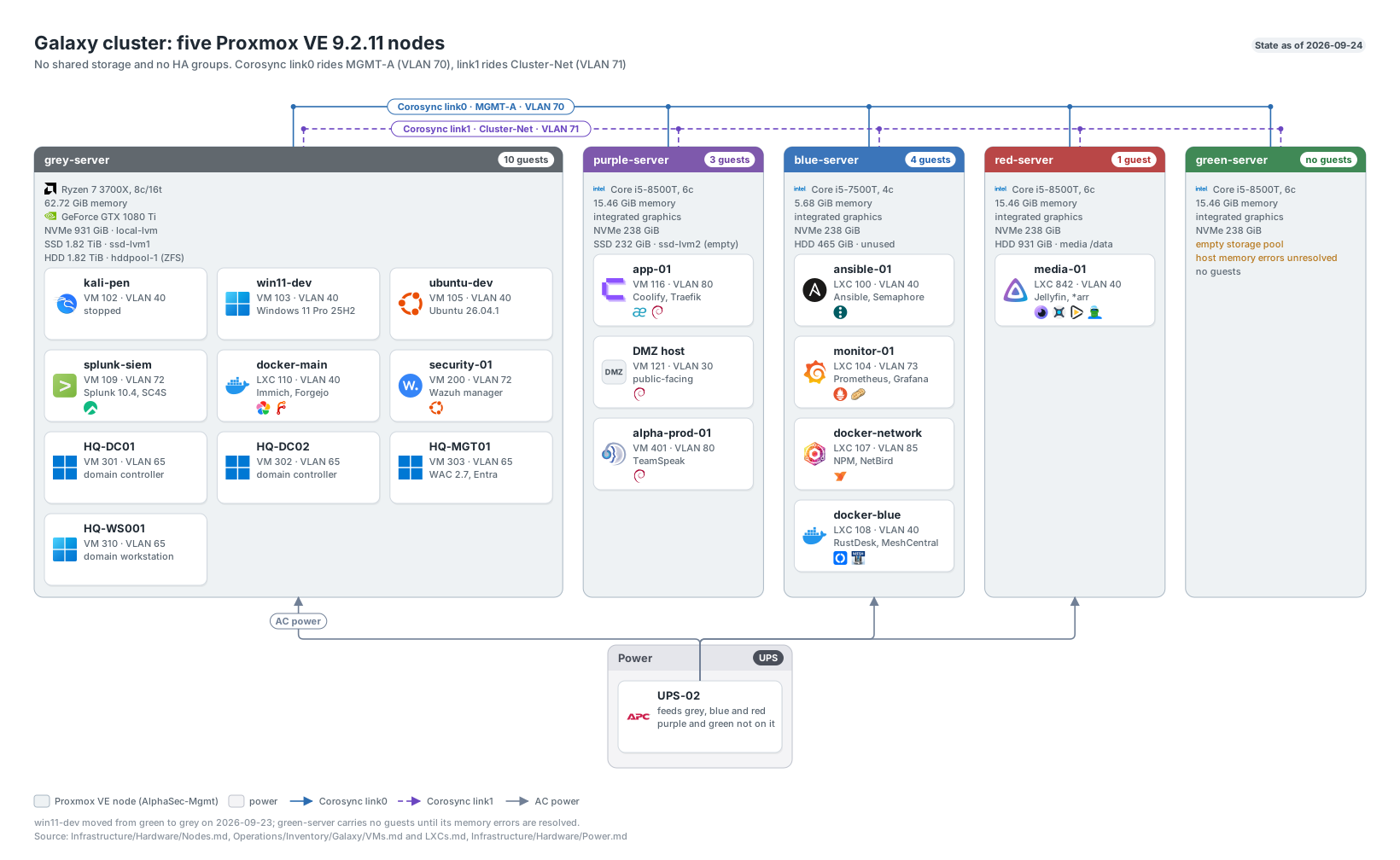
The five nodes, their storage pools and guests, and both Corosync rings, from the repository’s diagram set. Click to enlarge.
Nodes and roles
| Node | Joined | Role | Guests on 2026-09-24 |
|---|---|---|---|
| grey-server | Founder | Main workload host. Carries the development VMs, the SIEM and security stack, the Active Directory guests, the main Docker LXC and all three templates. Serves UPS-02 over NUT. | VMs 102, 103, 105, 109, 200, 301, 302, 303, 310; CT 110; templates 101, 300, 9000 |
| purple-server | 2026-05-30 | Application host on NVMe | VMs 116 app-01, 121 edge-01, 401 alpha-prod-01 |
| blue-server | 2026-05-30 | Small infrastructure LXCs | CTs 100 ansible-01, 104 monitor-01, 107 docker-network, 108 docker-blue |
| red-server | 2026-07-07 | Media host with a local HDD | CT 842 media-01 |
| green-server | 2026-07-31 | Empty until its memory fault is fixed | None |
Grey carries most of the load: 51.61 of its 62.72 GiB was in use on 2026-09-24, while Green sat empty. That imbalance is the main reason I looked at shared storage and the 9.2 load balancer (see below).
Node naming
Nodes are named after colors with a -server suffix. The nodes built for the cluster use the .galaxy domain in their FQDN (purple-server.galaxy, blue-server.galaxy, green-server.galaxy). UniFi holds one local DNS name per node for its web GUI (grey.alphasecunited.com through green.alphasecunited.com), and the UniFi client list knows Green as green-node.
I planned a rolling rename of every node to a *-node name and started it on Green’s PXE registry entry. I cancelled the rename on 2026-07-31, reverted the registry to green-server, and kept the existing names. The cancellation is also why Green’s Prometheus rollback copy was deleted: Green became permanent under its current name.
Corosync and quorum
Corosync runs knet in passive link mode over two links, with secauth on. I set no link priorities, so Corosync prefers link0 and link1 carries the redundant path.
link0on MGMT-A, VLAN 70, through each node’svmbr0.70. This interface also holds the node’s default route, its web GUI and SSH.link1on Cluster-Net, VLAN 71, throughvmbr0.71. This is an IP-only interface with no gateway. The network has no DHCP, no Internet access and no general hosts: it exists for east-west cluster traffic only.
Two links mean that losing one network does not cost quorum, because Corosync keeps talking over the other. They also differ in what else they carry: MGMT-A holds the GUI, SSH and the default route, while Cluster-Net carries cluster traffic and nothing else. Cluster-Net shares the AlphaSec-Mgmt firewall zone with MGMT-A but stays its own broadcast domain, and I keep it out of Threat Management inspection on purpose, because inspection adds latency to the one traffic class least tolerant of it.
The totem section of the tracked configuration:
totem {
  cluster_name: Galaxy
  config_version: 8
  interface {
    linknumber: 0
  }
  interface {
    linknumber: 1
  }
  ip_version: ipv4-6
  link_mode: passive
  secauth: on
  version: 2
}
Note: The tracked corosync.conf is the four-node
config_version: 8export from 2026-07-10. The live file has been at version 9 with five nodes since Green joined, and capturing it is an open item.
I aimed for three nodes in the first expansion because an odd vote count lets the cluster keep quorum after losing one node. With five votes the quorum is three, so Galaxy survives two nodes down.
I added link1 on 2026-07-10, one node at a time: create vmbr0.71, check gateway reachability and neighbor resolution, then add every ring1_addr plus interface { linknumber: 1 } and bump config_version from 7 to 8. I validated the candidate with corosync -c <file> -t before it went live. Red needed VLAN 71 admitted on its bridge first, and I then normalized its bridge-vids to 2-4094 to match the other nodes.
Bridges and guest networking
Each node has one VLAN-aware bridge, vmbr0. The host’s own addresses live on tagged sub-interfaces (vmbr0.70 and vmbr0.71), and guests attach to vmbr0 with a VLAN tag on their own virtual NIC. A host sub-interface only exists where the node itself needs an address. The four original nodes admit VLANs 2 through 4094 on the bridge; Green’s bridge-vids line is not recorded.
The switch ports use the UniFi Proxmox-Trunk profile, which has no native VLAN, so every frame must be tagged. That has one practical consequence for a manual install: the Proxmox installer puts the management address untagged on vmbr0, which cannot reach anything, so a new node needs a console edit to build the VLAN-aware bridge and vmbr0.70 before it can talk to the cluster. Proxmox-Trunk is stored as an exclusion list, and UniFi adds every new network to it automatically, so a new VLAN reaches the nodes only after I remove it from the list.
Storage
Each node’s storage belongs to that node alone.
| Node | Storage | Type | Backing device | Holds | Used (2026-09-24) |
|---|---|---|---|---|---|
| grey-server | local-lvm | LVM-thin | 1 TB Crucial P310 NVMe | VMs 102, 103, 105 and CT 110’s rootfs | 30.3% |
| grey-server | ssd-lvm1 | LVM-thin | 2 TB Crucial BX500 SATA SSD | VMs 109, 200, 301, 302, 303, 310 and the three templates | 11.0% |
| grey-server | hddpool-1 | ZFS | 2 TB Toshiba HDD, single disk | CT 110’s /data (Immich) | 70.7% |
| purple-server | local-lvm | LVM-thin | 256 GB Toshiba NVMe | VMs 116, 121, 401 | 28.4% |
| purple-server | ssd-lvm2 | LVM-thin, restricted to Purple | Samsung 850 EVO 250 GB | Empty | 0.0% |
| blue-server | local-lvm | LVM-thin | 256 GB Samsung NVMe | CTs 100, 104, 107, 108 | 39.0% |
| red-server | local-lvm | LVM-thin | 256 GB Samsung NVMe | CT 842’s rootfs | 31.9% |
| red-server | Host ext4 bind mount | Directory | 1 TB Seagate HDD | CT 842’s /data media library | Not in pvesm |
| green-server | local-lvm | LVM-thin | 256 GB Samsung NVMe | Empty | 0.0% |
Every node also has a local directory storage for ISOs and container templates. ssd-lvm2 is pinned to Purple in storage.cfg:
lvmthin: ssd-lvm2
	thinpool ssd-lvm2
	vgname ssd-lvm2
	content rootdir,images
	nodes purple-server
Warning:
pvesm statusanswers for the node you ask. A storage restricted to one node readsactivethere anddisabledeverywhere else, with nodisableflag set anywhere. Reading one node’s output as the cluster’s answer is howssd-lvm2was once recorded as disabled when it never was. I read each node’s own storage instead.
Two capacity notes. Purple’s thin volumes were provisioned at 154.01 GiB against its 140.87 GiB pool after alpha-prod-01 moved there on 2026-09-12, so any new allocation on Purple needs a capacity check first. And hddpool-1 read 82.46% on 2026-09-06 and 70.7% on 2026-09-24; nothing in the records explains the roughly 200 GiB it gave back, and finding it is an open item.
Moving a guest between nodes copies its disks across the network. The September moves (app-01 and edge-01 to Purple, alpha-prod-01 to Purple, ansible-01 to Blue, win11-dev from Green to Grey) all worked that way.
Templates
All three templates live on Grey’s ssd-lvm1. They boot UEFI (OVMF) on the q35 machine type with virtio-scsi-single, CPU type host, and the QEMU guest agent enabled.
| VMID | Name | OS | vCPU | Memory | Disk | Default VLAN | Notes |
|---|---|---|---|---|---|---|---|
| 101 | debian13-template | Debian 13 | 4 | 4 GiB | 60G | 40 | General Linux base |
| 300 | ws2025-template | Windows Server 2025 Standard | 4 | 4 GiB | 80G | 65 | Built 2026-09-08. Guest agent, OpenSSH Server and virtio driver media, TPM 2.0, sysprepped. Source of the three Windows Server guests cloned on 2026-09-09 |
| 9000 | ubuntu-cloud-template | Ubuntu 24.04.4 LTS | 2 | 2 GiB | 20G | 80 | Carries a cloud-init drive |
Note: Sysprep does not regenerate SSH host keys, so every clone of template 300 presents the template’s fingerprint until the keys under
C:\ProgramData\sshare deleted andsshdis restarted.
How templates and the PXE path fit into building new machines is on Provisioning.
No shared storage, no HA
This is a deliberate state, and it took one incident to get here.
On 2026-07-20 I shut Blue down to move nodes onto a UPS. CT 107 and CT 108 were HA resources with their root disks on Blue’s node-local local-lvm. datacenter.cfg set no HA shutdown policy, so the default conditional policy relocated both containers on shutdown. Their configs moved to Purple, their disks could not follow, and both looped into the HA error state. Nginx Proxy Manager, NetBird and the RustDesk relay were down for about 34 minutes. The data was safe on Blue, so the fix was to remove both from HA, move the configs back and start them. I then pinned them to Blue with a strict node-affinity rule, pin-blue-local-storage, so HA could never send them to a node without their disks again.
That rule made HA pointless for these two: it could only restart them on Blue, which onboot already does. Sometime between 2026-09-06 and 2026-09-23 both HA resources and the rule were removed. I found the change on the 2026-09-24 readback and recorded it after the fact; the task logs on Grey would date it exactly. A Blue outage still stops both containers until Blue returns, which is the same result HA gave, without the relocation path that stranded them.
My shared storage research of 2026-08-23 explains why I have not built anything yet:
- The 9.2 load balancer has nothing to move. It only migrates started HA resources. Grey’s busy guests are outside HA, and the only HA resources at the time were pinned to one node.
- Shared storage is necessary but not sufficient. Every VM uses CPU type
hoston AMD Grey, while the other four nodes are Intel, so cross-vendor live migration needs a tested common CPU model first. Blue and Green also lack the memory to absorb Grey’s guests, and CT 110 and CT 842 depend on node-local data or devices. - Ceph does not fit this hardware. Proxmox recommends near-identical nodes, at least 8 GiB of memory per OSD, a 10 Gbps network used only for Ceph and at least 12 OSDs. Galaxy’s nodes are mismatched, Blue has under 6 GiB of usable memory, and there are neither 12 eligible disks nor a dedicated 10 Gbps network.
- ZFS replication is not an immediate path. There is one ZFS pool, on Grey, with no matching target.
The practical route, if I do it, is an external NFS datastore on redundant storage with its own network path away from Corosync, proven first with a disposable VM and LXC. A single NFS box would give planned mobility, not real HA.
Cluster firewall
Two firewalls sit in front of every node, and a path needs both to say yes. UniFi decides whether traffic reaches MGMT-A at all. The Proxmox Datacenter firewall then decides what each node accepts. The access side of this “two yeses” rule is on Access paths.
The Datacenter firewall is one file, /etc/pve/firewall/cluster.fw, replicated to every node by pmxcfs. It enables the firewall and applies one security group, pve_mgmt, which lands in every node’s PVEFW-HOST-IN chain. No node has its own host.fw; I deleted Grey’s because it applied the same group a second time and held only disabled rules.
The rules in pve_mgmt, in order, in prose:
- The five node addresses (IPSet
pve_cluster) may reach each other on SSH and the web GUI, for inter-node SSH and the GUI proxy. - My personal admin devices (IPSet
pve_admins: Jedi PC, the MacBook Air, the Pixel, Parrot OS-Mac andubuntu-dev) get SSH, the web GUI and the SPICE proxy. - The automation controller,
ansible-01(IPSetpve_automation), gets SSH and the web GUI. - Service clients that only read the API (IPSet
pve_svc_clients:monitor-01and the dashboard ondocker-main) get the web GUI port only. monitor-01may scrape node_exporter on every node, and NUT on Grey and Red.- The WireGuard VPN range may reach MGMT-A and SERVERS-A.
- Everything else aimed at SSH or the web GUI is dropped.
The drops come after the accepts and are order-sensitive, so every new accept goes above them. Proxmox also generates its own management IPSet for VNC, SPICE, migration, SSH and the GUI. Its only member is the MGMT-A subnet, so those generated accepts only ever admit another node. Anything a client off MGMT-A needs has to be granted by name in pve_mgmt, which is what cost me the SPICE console until I added it on 2026-08-07.
The current shape dates from 2026-07-13, when I renamed the old zero_access group to pve_mgmt and split its flat host list into purpose-named IPSets. On 2026-07-27 the MGMT-A lockdown removed the SSH exception for the Termix web terminal on docker-main, leaving that host with API access only.
Node baseline
Every node runs key-only root SSH (aligned on all five since 2026-09-07), node_exporter and a Wazuh agent. When Red joined I matched its APT sources to Grey’s: the Proxmox and Ceph no-subscription repositories enabled, the enterprise repositories present but disabled. The subscription popup patch is one guarded script, /usr/local/sbin/disable-proxmox-subscription-popup, with the same hash on all five nodes since 2026-07-31. It refuses any JavaScript layout it does not recognize instead of rewriting it. An APT DPkg::Post-Invoke hook re-applies it after every proxmox-widget-toolkit upgrade; I proved the hook by reinstalling the package on Green and watching it re-patch inside the same transaction.
History
| Date | Change |
|---|---|
| 2026-05-27 | Prepared Grey for expansion: cleaned duplicate APT sources, removed every trace of a retired member, sith-server, and moved the cluster identity from an old VLAN 40 address to MGMT-A. Grey ran Proxmox VE 9.2.2 as a single-node cluster named Galaxy. |
| 2026-05-30 | Joined Purple and Blue: one to three nodes on 9.2.2. |
| 2026-07-07 | Joined Red as the fourth node; quorum three of four. |
| 2026-07-10 | Added Cluster-Net and Corosync link1 on all four nodes (config_version 8). |
| 2026-07-13 | Restructured the Datacenter firewall into purpose-named IPSets. |
| 2026-07-20 | HA local-storage stranding of CT 107 and CT 108 after a Blue shutdown. |
| 2026-07-25 | Replaced Purple’s worn-out boot NVMe with a cloned Toshiba and added the 850 EVO. |
| 2026-07-28 | Created ssd-lvm2 on Purple. |
| 2026-07-31 | Joined Green as the fifth node through Galaxy PXE. Moved memory between Blue and Green and added a SATA HDD to each. Cancelled the planned *-node rename. |
| 2026-08-01 | Upgraded all five nodes from 9.2.5 to 9.2.6 and rebooted them one at a time, smallest blast radius first (Green, Purple, Red, Blue, Grey), onto kernel 7.0.14-8-pve. Quorum stayed at five votes throughout. |
| 2026-09-04 | Upgraded all five nodes to 9.2.11 in the order Green, Purple, Red, Blue, Grey, with no node or guest rebooted. Kernel 7.0.14-15-pve was installed everywhere and left for a later rolling reboot. |
| 2026-09-06 to 2026-09-23 | HA resources and the Blue pin rule removed (found 2026-09-24). |
| 2026-09-20 | Green’s memory test failed; win11-dev moved from Green to Grey on 2026-09-23. |
Open items
- Isolate Green’s faulty memory module or slot, and place no guest on Green until a full offline test passes.
- Capture the live five-node
corosync.confinto the repository. - Date the HA removal from the Proxmox task logs.
- Find what released about 200 GiB on
hddpool-1. - Decide whether the dedicated PXE join key stays trusted for root on all five nodes or goes back to being scoped to Grey.
- Finish the rolling reboot onto kernel
7.0.14-15-pvethat the 9.2.11 update left open; on 2026-09-24 only Blue was running it.